sassasol
Known Participant
March 12, 2017
Question

Error message when opening a file in cp8

  • March 12, 2017
  • 1 reply
  • 462 views

Hi!

I was trying to open a project file but got this message (see attached image.)
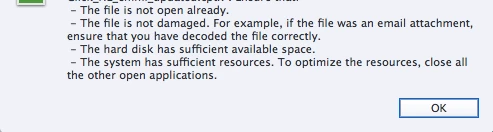
I have no problems to open other project files so I don't know what has gone wrong this time.

I have enough space and I know the file is not already opened (at least not on my laptop.)

But, "...have decoded the file correctly", what exactely does that mean?

Me and my colleagues are always sharing files and we have always used "Save" and/or "Save as" and then copied the file to a certain folder where the other one can reach it.

Furthermore, "...the system has sufficient resources". What does that mean?

Last but not least, a colleague shared a project file via Google drive, but when opening it I receive the same error message.  What and where exactely do I have to check to be able to open the files?

Kind regards,

Sandra

This topic has been closed for replies.

1 reply

Lilybiri
Legend
March 12, 2017

Hi Sandra,

Don't take that message too literally because it appears for all kind of errors, not always even linked with those mentioned in that message.

I'm a bit worried by some of your sentences: Captivate files should not be on a shared, networked drive when you are working on it. You have to copy them to your system. After exiting you can shared the project using any method you prefer. If you are on Win, be sure to Run Captivate as Administrator as well.

The reasons for that project file not opening is just bit of guessing: if it is on a shared drive, be sure to copy to your system. Was the file closed by your collaborator? Maybe the file has corrupted, has some corrupt slides or objects? I suppose you are sure to use exactly the same version of CP?

sassasol
sassasolAuthor
Known Participant
March 12, 2017

Hi Lilybiri,

Thanks for answering!

Ok, I understand.

What I meant was that we are working on our own local drives, but we save and then copy and paste to the shared network where the other ones then can copy and paste it to their own local. We work on Mac by the way. I did download the file to my desktop, but I could not however open it.

I am using version 8.0.1.242. If the other ones would use CP8 but an earlier version or CP9, could that cause the error message?

On the other hand, I can't open another file from a colleague that actually has the same version as I have.

By "Closed", do you mean quit the Captivate file and not working on it?

The person who created the file can still open it, so that means not corrupted right?

Lilybiri
Legend
March 12, 2017

You should upgrade to 8.0.3, at least get rid of some bugs in your version.

If there is a 'lock' file in your colleague's folder, that could explain the message.  There is no real collaboration feature (too bad) in Captivate. You cannot check in/check out. When I'm working with someone else, after opening a file, I will immediately save with another version number.

If your colleague can open the file, it is not corrupted indeed. Unless your CP has some corruption. You could try to clear the Preferences in that case. Do not forget to clear the cache regularly as well.