
paigeb81723735
Participant
November 18, 2019
Question

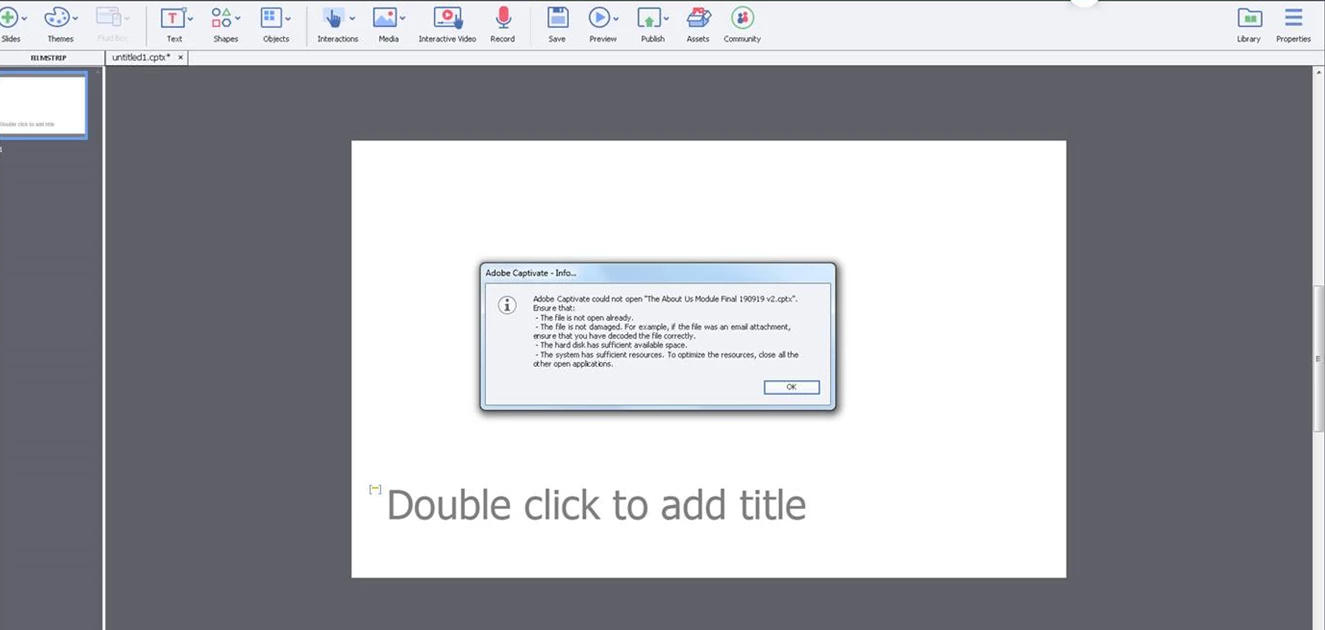
Error message when trying to open a file

  • November 18, 2019
  • 2 replies
  • 233 views

Hi everyone

I am using Capivate 19, version 11.0.0.243 

I have this error message appear when trying to open a captivate project from a shared office network.


The file is not open anywhere else

We are sure it is not damaged

We have enough space

It was saved multiple times


It has happened on more than one project. Can anyone advise if they have had this problem? 


Thank you

Paige


This topic has been closed for replies.

2 replies

Community Expert
November 18, 2019

Hi Paige,


this seems to happen on occasion. You should make sure "Generate project backup) is checked in Preferences for future projects. For now, if it is checked, perhaps you can try loading the back up file and hopefully that works.


On all projects you should also always save out various versions so you can open a previous version in case this issue happens. Many times working over the network can corrupt your files. So always better to download your files, work on them, save them out as a new version, and THEN copy it to the network.


You can try this dcache.zip file that seemed to have worked for some others with the same issue, this is recommended by Adobe on their help section!

https://helpx.adobe.com/captivate/kb/opening-corrupted-captivate-project.html


hope this helps!

cheers,

mark


headTrix, Inc. | Adobe Certified Training & Consulting
Lilybiri
Legend
November 18, 2019

Never open a Captivate file from a shared folder. Copy the file first to your system and open it from that location.


Moreover, install the patch to 11.0.1.266 or maybe to 11.5.1.499.