
Participant
February 12, 2016
Answered

Error uploading a SCORM package to LMS

  • February 12, 2016
  • 1 reply
  • 413 views

I've been having issues with some of my projects.  The first hint comes when I'm preparing to publish the SCORM package, take a look at the picture:
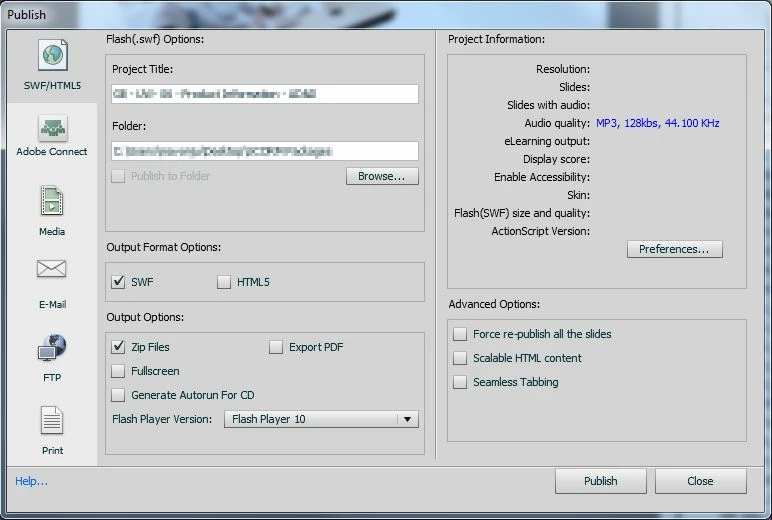
The Project Information details (most of them) are gone.  If I clicked on 'Preferences...', the details would be back when I return to this screen.  The package is generated with no issues, and it seems everything's ok.  However, whenever I try to upload the package to our LMS, I keep getting this error:
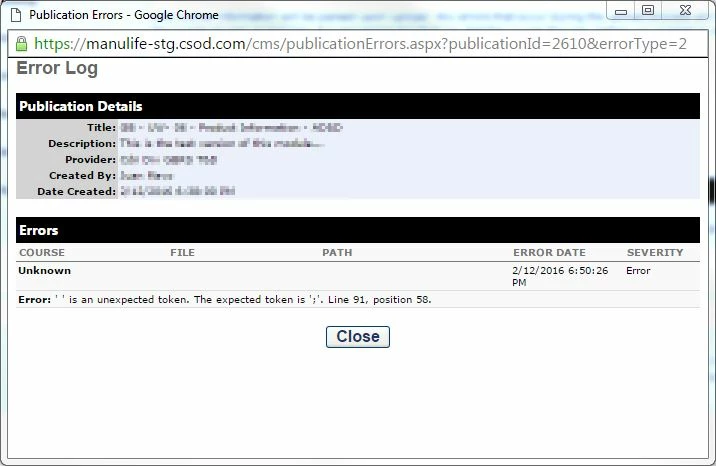
Have you ever seen / experienced this issue before?  I'm looking for some advice that could possibly prevent me from re-working a few modules.  I'm using Captivate 7.

Thank you! JM

This topic has been closed for replies.
Correct answer TLCMediaDesign

Do you have any special characters in the title?

Did you check line 91 in whatever file the error is referencing?

Is it referencing the imsmanifest?

1 reply

TLCMediaDesign
TLCMediaDesignCorrect answer
Inspiring
February 12, 2016

Do you have any special characters in the title?

Did you check line 91 in whatever file the error is referencing?

Is it referencing the imsmanifest?

Participant
February 17, 2016

Thank you for your prompt answer!  It was a special character, not only in the name of the cptx file but also:

  • In the project information tab
  • The identifiers and titles, in the Manifest details
  • The output filename (when publishing)

It's interesting, because I'm sure I have other pieces in the same situation, and they could be perfectly uploaded to the LMS.

Anyway, now what I will do from now on.  Thanks!