


Participant
January 19, 2023
Question

Error when trying to access captivate project uploaded to AWS

  • January 19, 2023
  • 2 replies
  • 398 views

Hello,

    I made an e-learning course to include in my portfolio (google site) rather than for uploading to a LMS

1.  I download the project to my device as an HMTL 5 file (not zipped)

2.  The download is successful and I can view/play the "output" and see my project.

3.  I upload it to my S3 bucket on AWS and the upload is successful.

4.  When I click on the index file to get the URL I get this message
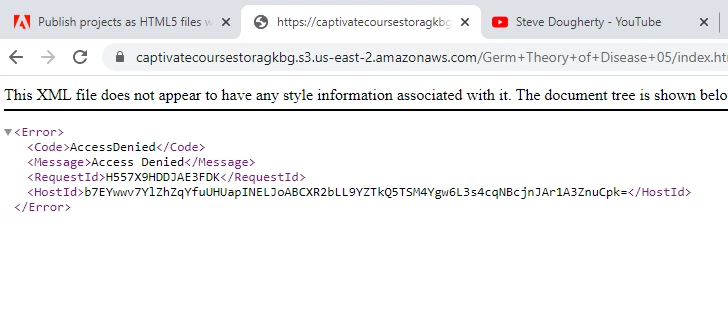
*I tried uploading a zip file and also uploading to a different hosting platform with the same result.  


Can anyone help with this?

    This topic has been closed for replies.

    2 replies

    Nancy OShea
    Community Expert
    Community Expert
    January 19, 2023

    I'd be very surprised if Google Sites supports it.  Perhaps you should ask Google Sites what you can use on their platform.


    Nancy O'Shea— Product User & Community Expert
    Lilybiri
    Legend
    January 19, 2023

    @Nancy OShea Projects in the eLearning community are uploaded to AWS (Amazon), why are you referring to Google?  A published Captivate project works on any webserver, provided it was not published as a SCO which needs a LMS. 

    Nancy OShea
    Community Expert
    Community Expert
    January 19, 2023

    The OP wrote:

    "I made an e-learning course to include in my portfolio (google site)."


    Experience tells me that Google Sites is not an ordinary web hosting platform.  They limit what you can & can't do on that service.


    Nancy O'Shea— Product User & Community Expert
    Lilybiri
    Legend
    January 19, 2023

    First question: did you activate reporting in Quiz Preferences which would have resulted in a SCO? If yes, the published folder can only be uploaded to a real LMS which is not the case for AWS. You could upload in that case to SCORM Cloud.

    Secondly: it is possible to upload a (non-SCO) published output in the eLearning community and they use AWS. Since I used that feature a lot in the blog posts I am creating in that community, I know that you need to have the output zipped by Captivate (feature in the Publishing dialog box). You may try to upload your project there. Here is an example, a recent uploaded project in:

    Software Assessment with Two Failure Messages - eLearning (adobe.com)

    It is possible to use this as a test, because you can check out the result in the Draft situation, no need to send it for review and publishing publicly.