

sade_p17629722
Participating Frequently
June 24, 2016
Question

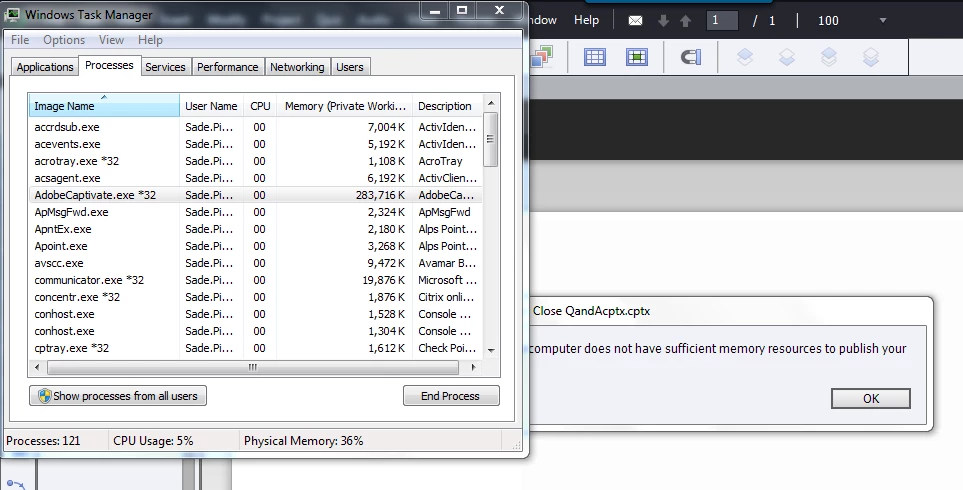
Error 'Your computer doesn't have sufficient memory resources to publish your file'
  • June 24, 2016
  • 5 replies
  • 3210 views

Hello,

I am trying to publish a course, but I am receiving this particular error message. Does anyone know the solution to this problem?

    This topic has been closed for replies.

    5 replies

    Participant
    December 21, 2020

    Hi, I have this error when publishing please help me.My computer has free memory.

    Eror:

    Your system does not have suggicirnt memory resources to publish your file.


    barbara_a7746676
    Community Expert
    Community Expert
    June 28, 2016

    Adobe does not have an official upper limit for Captivate project file sizes, but I would recommend less than 100 MB, preferably no more than 60 MB. While you may be able to publish with larger sizes, it is best practice and less likely to cause problems, to break a project down into smaller modules. I hope that is possible with your subject matter.

    Lilybiri
    Legend
    June 28, 2016

    Barbara, it is great to offer 'best practice' advice, but you should explain the origin of such advice and give more details. What you are now telling is contrasting with your previous advice of Clearing the cache (dangerous because you lose a backup possibility) or deleting the customized Preferences folder. Probably both solutions will not solve the issue at all.

    Which size are you talking about? Since recent versions there is no limit whatsoever the size of a CPTX project (dixit the engineers team). It is not even important at all, because the only size you have to focus on is the size of the PUBLISHED folder, whether it is a HTML folder or the files associated with SWF output. You can have a 200MB CPTX file that will lead to an acceptable published folder in file size, but it can also be possible to have a much smaller cptx-file that leads to an unmanageable output folder (sometimes bigger than the cptx-file itself if you publish both to SWF and HTML). You have to look at the future users: how will they access the course which depends on a lot of factors. During my consultancy jobs I try to keep file sizes down for published files and have a lot of techniques for that reason. I don't really bother about the cptx-filesize, the desktop/laptop that I'm using can handle easily larger files.

    It is important here to define what is causing the problems for the user, that is why I suggested hiding some slides (which is temporarily) and see if publishing will be possible. The cptx-filesize is not changing in that case, but the number of slides and objects that have to be treated for publishing will be less. If it is a published file size issue other remediation has to be proposed.

    Erik Lord
    Inspiring
    June 27, 2016

    The not-as-admin thing is likely the cause, but only way to know for sure is to run the project under an Admin login, or 'Run As' - both should work. If you can't do that on your own, find an IT person who can run it as Admin for you, if just temporarily, to see if that is the cause. If it is, well, then you either need to run as Admin or you may need IT to give you wider R/W permissions on a variety of folders that Captivate needs to use.

    Erik Lord
    Inspiring
    June 26, 2016

    'Resources' could certainly be available memory.

    Restart your computer.

    Shut down any task tray items that you don't need.

    Be sure you have a decent amount of available HD space; empty trash, clean temp items, CP Cache clear (as mentioned) etc.

    Start up CP and try again.

    -

    If not luck then, as a test, make a copy of your CP project and delete half the slides.

    Save As, close CP, reopen, and try to publish that sample half-project.

    Does that work?

    If so, maybe you need to trim down your CP project a bit.

    (I also recommend finding unused items in your library, deleting those, and Save As a new project file. Some disagree that is useful, but can't hurt)

    Participant
    September 25, 2021

    very impressive. thanks Erik.

    barbara_a7746676
    Community Expert
    Community Expert
    June 25, 2016

    The project file size is pretty large so it may be that the problem is simply what the message says -- insufficient resources. You can check that by trying to publish a smaller project, one that is perhaps 100mb or less.

    On the other hand, the error messages are not always correct. A couple of things you could try:

    Clear the cache. Go to Preferences > General Settings, and click the Clear Cache button. Then try publishing again.

    Delete the Captivate settings file. Close Captivate. Navigate to the folder where Captivate is installed on your computer. Open the Utils folder. Double click on the CleanPreferences file. Then relaunch Captivate and try publishing again.

    Lilybiri
    Legend
    June 25, 2016

    @Barbara: nothing indicates it is a large file at all? On the contrary, the Captivate exe file takes up a lot less memory than it is usually taking on my system.

    Clearing the cache can be a good idea, but Video Demo temp files have to be cleared manually. Moreover, if you clear the cache and have not set up the backup, you'll lose the last hope of recovering a previous version of the file using the cache.

    Clearing Preferences however is only really necessary when one suspects corruption of those Preferences. This is the last thing to do when nothing else helps solving the issue, because you lose ALL customisation! It is possible to recover some custom elements but you have to prepare them before clearing the Preferences. Have a look at:

    Captivate 8.0.1 Install? Keep your Customisation! - Captivate blog