Inspiring
August 17, 2016
Answered

Errors when reporting to LMS

  • August 17, 2016
  • 5 replies
  • 364 views

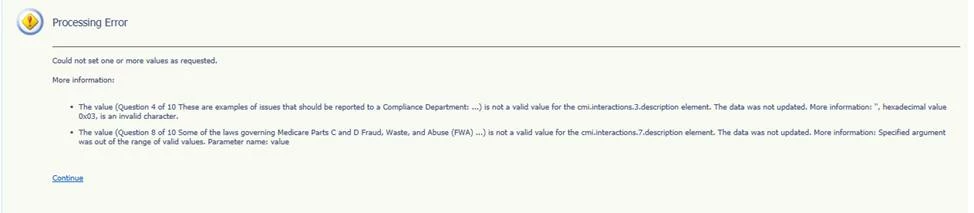
I am publishing with captivate 9, scorm 2004 -4. swf. I have 10 quiz questions. I am getting this error over and over even after deleting all quiz questions and recreating. I've hit a wall with this:

    This topic has been closed for replies.
    Correct answer rachelr26200645

    Seems like a fixed it. An odd character may have made it's way into either the quiz page or the accessibility properties. I just deleted and keyed in new text. However, I never saw any strange characters -  I know to avoid that. some random code from a word doc cut and paste may have made it's way in.

    5 replies

    Inspiring
    August 18, 2016

    could it be somewhere off the two quiz pages in question? I've seen problems when publishing with bad characters in the Accessibility properties text input area. But that is just when I was publishing where i saw the grey wheel endlessly spinning. This is a different sort. I emailed adobe.

    Inspiring
    August 18, 2016

    Thanks, Allen. Sending to that email now. Yes, I'm in pain.

    Allen_Partridge
    Adobe Employee
    Adobe Employee
    August 18, 2016

    Usually when you get those kinds of errors its because of illegal characters - you are correct. They shouldn't be able to slip through however - so the question is, where are the little devils. ;)

    value of a variable?

    names of items?

    any use of \ or similar characters? Use of quotes in a name?

    name of item uses a reserved variable name or keyword in the LMS or browser? 

    Did you try publishing to scormcloud using preview in scormcloud - that would let you see the trace on the publish and perhaps help better define the cause? You might also want to share the project with us at captivateHelp@adobe.com - an engineer may be able to find it with less pain.

    --Allen

    Inspiring
    August 18, 2016

    No I do not paste directly from word. I still have problems with the same two quiz pages even though I deleted them and recreated from scratch and hand keyed all text. True frustration. The same two pages give me LMS errors like a phantom bug. ht

    rachelr26200645AuthorCorrect answer
    Inspiring
    August 17, 2016

    Seems like a fixed it. An odd character may have made it's way into either the quiz page or the accessibility properties. I just deleted and keyed in new text. However, I never saw any strange characters -  I know to avoid that. some random code from a word doc cut and paste may have made it's way in.

    RodWard
    Community Expert
    Community Expert
    August 17, 2016

    Never paste any text from some Microsoft document straight into Captivate unless it's from Notepad.  Plain text is your friend.