Known Participant
October 30, 2022
Answered

Erste Folie in Veröffentlichung festlegen

  • October 30, 2022
  • 1 reply
  • 198 views

Hallo, in meinem veröffentlichten Projekt ist die erste Folie immer weiß mit einem Play Button. Ich möchte aber, dass die erste Folie meines Projektes gezeigt wird. Lässt sich das irgendwie einrichten?

    This topic has been closed for replies.
    Correct answer Lilybiri

    Sorry, but I don't dare to write in German, which I understand pretty well.

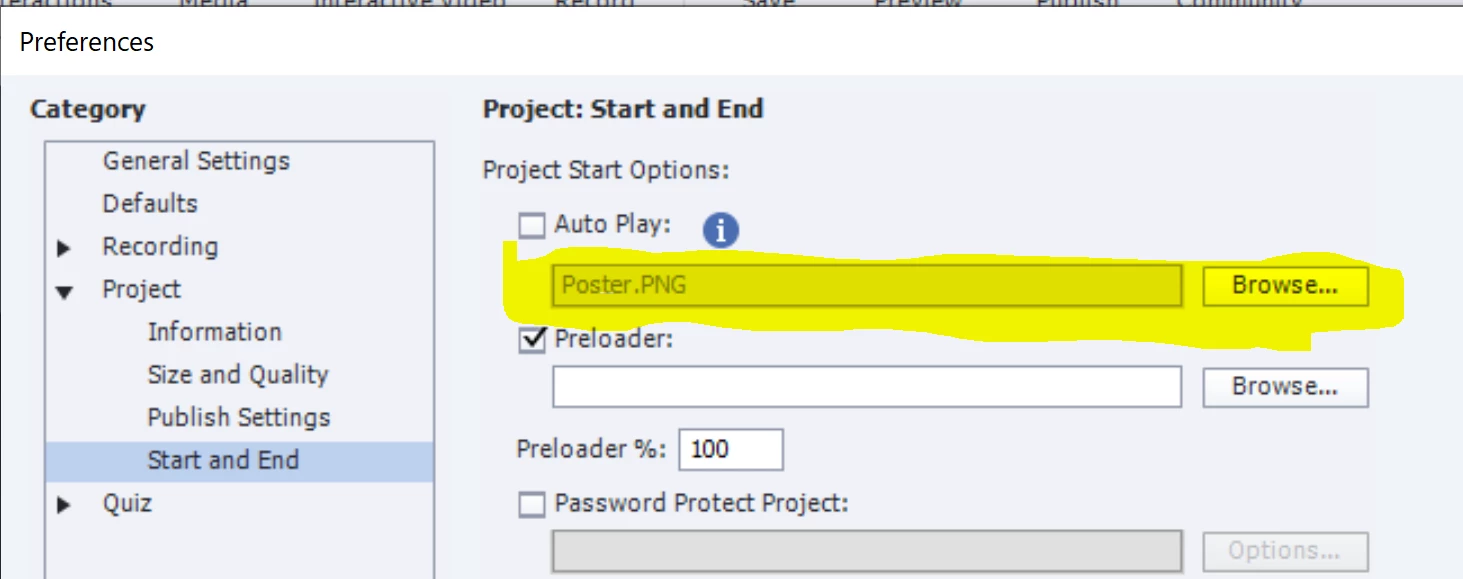
    Presently there is no way to do this automatically. I take a screenshot of the slide I want to use as poster, and even insert an image in the center to replace the ugly gray arrow and insert it using Preferences, Project, Start and End:

    Here is an example

    It means that you need to replace the gray arrow by an empty png. I described the complete workflow in this blog post:

    https://blog.lilybiri.com/poster-image-autoplay


    1 reply

    Lilybiri
    LilybiriCorrect answer
    Legend
    October 30, 2022

    Sorry, but I don't dare to write in German, which I understand pretty well.

    Presently there is no way to do this automatically. I take a screenshot of the slide I want to use as poster, and even insert an image in the center to replace the ugly gray arrow and insert it using Preferences, Project, Start and End:

    Here is an example

    It means that you need to replace the gray arrow by an empty png. I described the complete workflow in this blog post:

    https://blog.lilybiri.com/poster-image-autoplay


    Known Participant
    October 30, 2022

    A quick and helpful answer. Many Thanks. 🙂

    Lilybiri
    Legend
    October 30, 2022

    Sure, you're welcome...