
hms413
Participating Frequently
April 11, 2016
Answered

Execute Link THEN show a button using "Execute Javascript" Action

  • April 11, 2016
  • 1 reply
  • 382 views

In my Captivate project, I want users to be forced to click on a link BEFORE advancing slides. So I was trying to figure out how to add TWO actions to one button: 1) open URL in new window, 2) upon opening the link, the "Next" button now SHOWS (or is enabled.) I thought the best way to do this would be to write my own Javascript. I'm surprised Captivate doesn't allow multiple Actions for one object.

Any help!? Specifically on the javascript code for this! THANKS in advance!

Haley
This topic has been closed for replies.
Correct answer Lilybiri

I added open URL and that works. Then my second action I added "Show" or "Enable" the second button (which says NEXT). But when I preview in Browser, the NEXT button shows anyways before the first button it clicked.

So my main question now, is how do I HIDE my Button#2 until the action tells it to "SHOW."


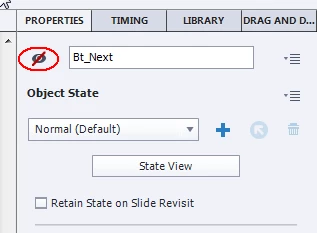
Was the next button first set to be invisible in output? You can uncheck this visibility by clicking the eye icon in the Properties panel of that button.

1 reply

TLCMediaDesign
Inspiring
April 11, 2016

It does allow you to choose multiple actions, but you need to create an advanced action first.

hms413
hms413Author
Participating Frequently
April 11, 2016

Thanks!!

I was looking into the Advanced Actions- not very familiar with writing them though. Would the two actions be conditional? Or would I just add two actions for: execute URL, enable button? How would I do this in the Advanced Action?

TLCMediaDesign
Inspiring
April 11, 2016

It does not need to be conditional. Just add the two actions.