
Known Participant
August 30, 2018
Question

Exit Button and opening web page

  • August 30, 2018
  • 3 replies
  • 397 views

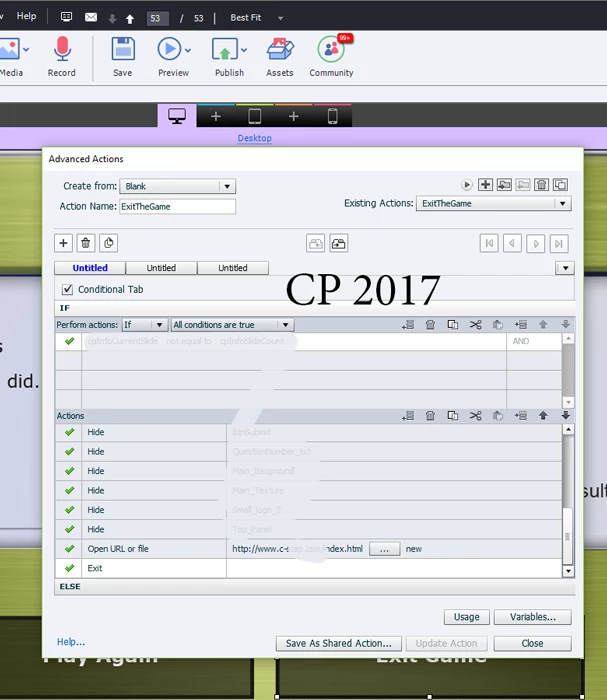
Dear Community,  Please show me where I'm going wrong.  I have an exit button that when the student presses will open a web page, and then close the lesson.  Unfortunately, the web page does not open.  Here is the advanced action.  I appreciate you guidance.
This topic has been closed for replies.

3 replies

Jeremy Shimmerman
Participating Frequently
August 31, 2018

Just a suggestion as a workaround.

When you exit a Captivate project it automatically executes the goodbye.html file in your published folder.

You can edit the goodbye.html file and add in a script to open the url page.   

Lilybiri
Legend
August 30, 2018

Every command in an advanced action will be done in sequence from top to down, and from left to right in case of an action with multiple decisions. Since you have the 'Open URL' command followed immediately by an Exit command, the Exit will happen just after opening the Webpage. You could use the Delay command which appeared a couple of versions ago, if you know how much time you will allow to view that URL. If not, you would better split up the commands. Hide everything (was it not possible to group those items and have Hide Group) and open the URL. Offer the learner another button for Exit.

TLCMediaDesign
Inspiring
August 30, 2018

Try using the delay next action by for the exit action. Set it to a few seconds.