


danielb51742821
Inspiring
June 15, 2021
Answered

Exit button in Captivate playbar does not send resume data as expected.

  • June 15, 2021
  • 1 reply
  • 1176 views

Captivate 2019 11.5.5 in a Moodle LMS


Any suggestions?


Hi,

It was reported to me that a course I develop and manage that is expected to resume at the last visited slide was not working properly. The course is set to:
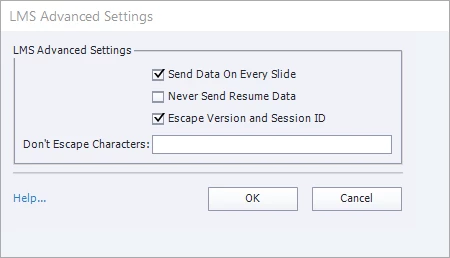
Also, the course is set in the LMS to open in the current window, not a pop up. Not sure if this relevant. 


The report did not state that they were forced to start over, but that they were being returned to a slide that they had previously exited from. After some testing, I noticed different results based on how you exit the training. I experienced exactly what the report stated. I had already had some activity on the course. I opened the course and it opened to the expected slide, 5 of 69. Great. However after advancing to slide 10 of 69 and clicking the X provided by a captivate toolbar, the course reopened to the previously exited slide 5 of 69, not the last exited slide. Taking this one step further, if I proceed through the course to 11 of 69 and leave the course by returning to the LMS's dashboard and then revisit the course - I land on the expected slide of 11 of 69.


So what I am experiencing is the captivate navigation bar's exit button is not sending resume data, but other means of exiting the course and returning are bringing the user to the expected slide they left off from.


    This topic has been closed for replies.
    Correct answer danielb51742821

    You could try this JS:


    SCORM_Finish("SUSPEND", false)


    Thanks.

    I found a workaround that works for me.

    I created an advanced action that opens another url within the LMS the scorm is in (the "Course Page") and applied to all of my exit buttons on each slide. This worked. It seems that anything with the command Exit is not working  for me. 


    1 reply

    danielb51742821
    Inspiring
    June 17, 2021

    Just checking in on this issue. My testing still proves only the captivate navigation bar's exit button does not return the user to the last page visited. There is a report in the LMS that tracks cmi.core.lesson_location and cmi.suspend_data. This report shows that the values update when a user exits the scorm package EXCEPT when they use the Exit button in the Captivate tool bar.


    Any suggestions?

    TLCMediaDesign
    Inspiring
    June 17, 2021

    I would remove the exit button from the playbar and create your own.


    Sound like the exit button in the playbar is not teminating the SCORM session correctly.


    I've used my own button and execute the simple command "Exit" and it has always worked correctly.

    danielb51742821
    Inspiring
    June 17, 2021

    Thank you TLC.

    I was trying to avoid that since Im using the built in playbar, but I did go ahead and do that.

    I used a transparent button and formatted it with color, etc, and place just above the captivate playbar. It actually doesnt look that bad.

    However, I still get the same results.

    Is there an advanced action I can apply along with something else (JS or another built in command) that will send the last visited location to the LMS?

    I can still get this to work if I dont use an exit button in the training, but it should work and shouldnt be this challenging!