Answered
Export project as file SCORM 1.2
Hi.
I created a project with different resources and now i need export project as file SCORM 1.2.
But not find this option.
Is possible publish project this mode?
I use Captivate 9
Thanks for help me.

Hi.
I created a project with different resources and now i need export project as file SCORM 1.2.
But not find this option.
Is possible publish project this mode?
I use Captivate 9
Thanks for help me.
Yes, (I'm using Cp 8) select Preferences in the Edit menu, click the Reporting entry in the Quiz section and click the checkbox to "Enable Reporting for this project,"
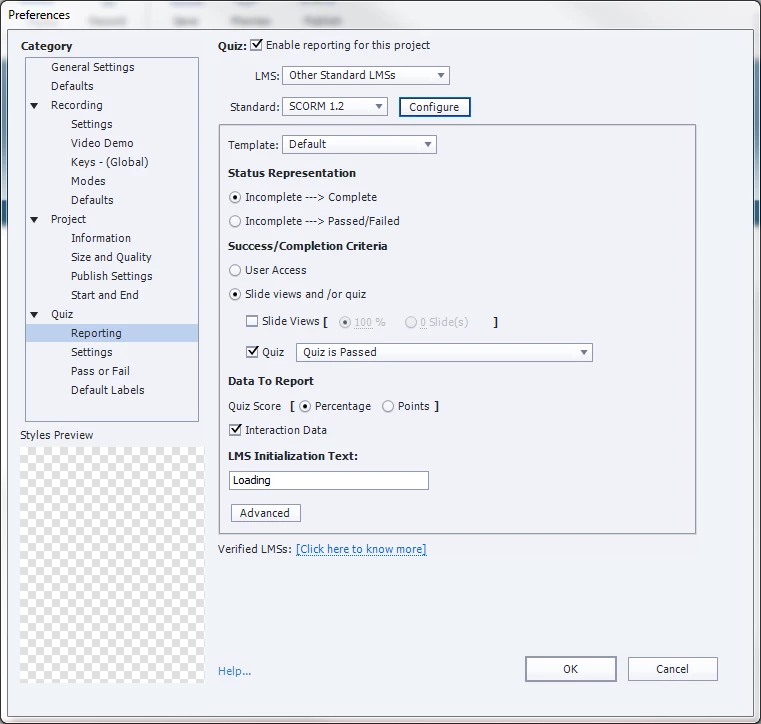
under the Standard dropdown, select SCORM 1.2 and click configure.
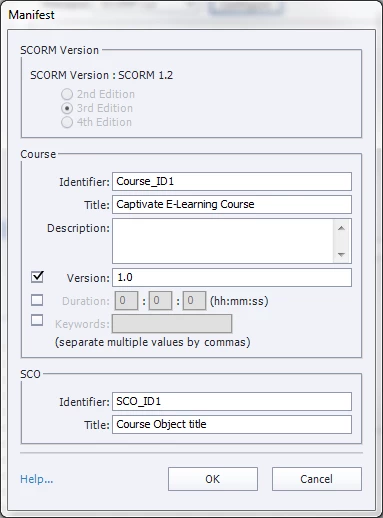
Set the identifiers, titles and description fields to something unique for this course:
Already have an account? Login
Enter your E-mail address. We'll send you an e-mail with instructions to reset your password.
 AdChoices