


Participating Frequently
April 24, 2025
Answered

Expression in Captivate 12

  • April 24, 2025
  • 4 replies
  • 440 views

Hello! 

I need help with what would be a fairly straightforward Advanced Action in the old Captivate, but expressions do NOT quite display the same in Captivate 12. I have been unable to find any information about expressions beyond, you can add an expression in Captivate 12 using Assign Variable. Indeed, the option to add an expression is THERE, but no longer has operators (+, -, /, *) in drop-down menus, just a blank line. I have tried everything I can think of for this simple calculation, including learning more about JavaScript, but it shouldn't be that hard!!   I want to add two variables to get a total on another variable: Total_Bounce = Q1 + Q2. 


Here are some of the problems I have encountered: 
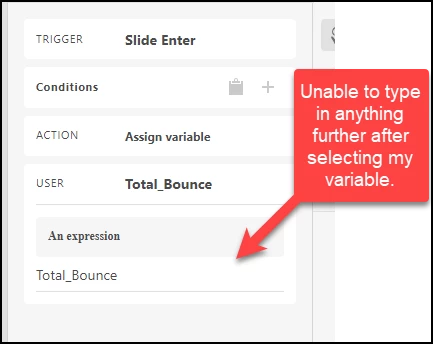
 

Copy and pasted the expression: 
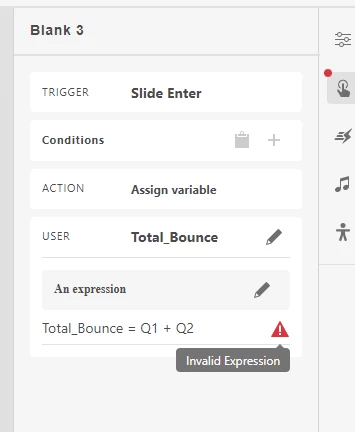
 

Any help from users who have used expression in Captivate 12? 


TIA



    Correct answer Paul Wilson CTDP

    I recently did this using JavaScript. Here is the video. Let me know if this helps: https://youtu.be/e9O8lNanKLY

    4 replies

    Paul Wilson CTDP
    Community Expert
    Paul Wilson CTDPCommunity ExpertCorrect answer
    Community Expert
    October 27, 2025

    I recently did this using JavaScript. Here is the video. Let me know if this helps: https://youtu.be/e9O8lNanKLY

    Paul Wilson, CTDP
    Tara K.Author
    Participating Frequently
    November 10, 2025

    YES!! This was it! Worked perfectly using Paul's video as a tutorial! I hope Captivate fixes this issue with expressions, but if you are in a pinch, this works. 

    Tara K.Author
    Participating Frequently
    October 9, 2025

    AI now gives a solution for how to do an expression in the new Captivate. The directions are exactly as I had already tried, but though, ok i'll try again. Not only cannot use the keyboard to put in a + sign, even when copying and pasting my expression, i still get "invalid expression". 


    Adobe Employee
    October 16, 2025

    It appears to be designed so that you cannot manually type the variable name. you must select it from the variable list dialog. I tried this, and it works. attaching video here for reference.

    Tara K.Author
    Participating Frequently
    October 20, 2025

    super interesting, after the first variable,  i dont have a lookup/magnifying glass to select another one or an option to choose which expression i want. 

    Participant
    August 1, 2025

    Any luck finding a solution? Just ran into this issue as well after switching from Classic.

    Tara K.Author
    Participating Frequently
    August 1, 2025

    I received a reply from Adobe in another forum saying "they could do it" and to upload my Captivate. I tried multiple times to upload and asked to email the file and never heard back...

    TheOriginalGC
    Community Expert
    Community Expert
    August 3, 2025

    To share a file on the forums or in DM, you have to upload it to a fire sharing site like Drop Box or Google Drive and then post the link to the file.

    John T Smith
    Community Expert
    Community Expert
    April 24, 2025

    You need to ask program questions in the forum for the program you are using
    To ask in the forum for your program please start at https://community.adobe.com/
    Moving from Using the Community (which is about the forums) to the correct forum

    Tara K.Author
    Participating Frequently
    April 24, 2025

    yes that URL is where I started and based on the URL that I accessed, community.adobe.com/t5/captivate-discussion I believed i had the right place to start...