
Known Participant
September 20, 2018
Answered

F4 on Excel simulation recording

  • September 20, 2018
  • 1 reply
  • 407 views

Hello

I am doing a Adobe Captivate simulation recording on Excel and I have a problem.  When I click F4 to turn the values selected in to reference and absolute it does not work, when I am not recording it works.
This topic has been closed for replies.
Correct answer RodWard

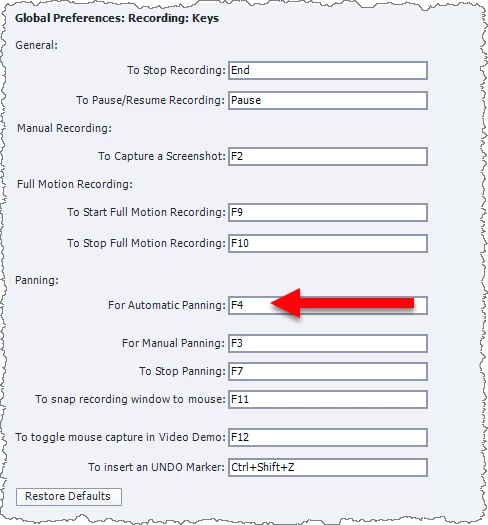
The default usage of F4 keystroke during a Captivate simulation capture is to turn on automatic panning.

Try changing this keystroke default in your Global Preference settings to something else and then try another capture to see if that resolves the issue.

1 reply

RodWard
Community Expert
RodWardCommunity ExpertCorrect answer
Community Expert
September 20, 2018

The default usage of F4 keystroke during a Captivate simulation capture is to turn on automatic panning.

Try changing this keystroke default in your Global Preference settings to something else and then try another capture to see if that resolves the issue.

djquimosoAuthor
Known Participant
September 20, 2018

Thank you RodWard. Your a life saver.  It's working now. Just out of curiosity what is Panning?

RodWard
Community Expert
Community Expert
September 20, 2018