
Known Participant
February 14, 2011
Answered

Fade in Fade Out between slides

  • February 14, 2011
  • 2 replies
  • 8146 views

Hi,

I am using Adobe Captivate 5 and putting together a demo to show screen recording alongside video.

This has been split between several slides. My problem is that for each slide, I have 'No transition' selected, yet when it plays (either in  preview or when I publish to SWF and HTML), there is a fade out/fade in to each slide.

I have tried to look over the settings to see if there was a default setting that managed this but I can't find an option to prevent the fade out/fade in so that the entire project plays seamlessly.

Thanks
This topic has been closed for replies.
Correct answer Lilybiri

Success!!

I realised it was using the master slide as a background on each slide - instead I changed it to have the same Project Background file, rather than using a Master Slide. It's a tiny pain which I can live with for the moment.

Such silliness (couldn't find a way to manage Master Slide settings) but sorted now.

Thanks for all your help and patience with this!


Hello,

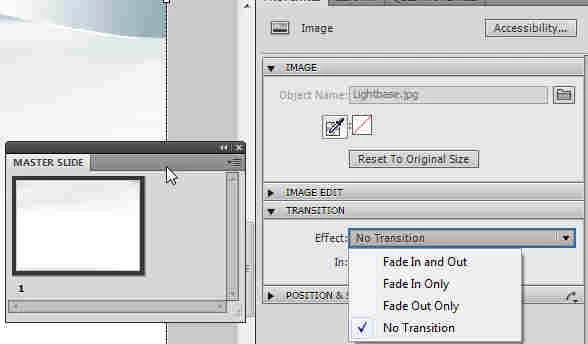
If it was due to a transition effect on the Master slide, it is really easy to change this to No Transition: look on the Master slide Panel, probably there is something inserted (image?) with a transition effect, and you get its Properties in the Property panel. In the Properties you have the Transition accordion, change the Transition just like you would do for a normal slide. In this screenshot you see an example, with an image on the Master slide.

Lilybiri

2 replies

Lilybiri
Legend
February 14, 2011

Hello and welcome to the forum,

It will indeed be due to objects that are set to fading transitions. Just want to add that by default the first slide in a project fades in and the last slide fades out. You can change that in the Preferences, Project, Start and End.

Lilybiri

Participating Frequently
March 2, 2013

Fantastic! I have spent so much time trying to figure this out! Thank you for the simple fix.

February 14, 2011

Hi,

Recording also adds different types of objects to your Captivate project, other than the slide alone. If any of the other objects have transition setting to "Fade in and Out", it's possible that the slide will have the same transition effect.

Please run through your project to see if there are any such objects and reset them to No transition.

And, there is a simple way to do this. From the Object Style Manager (Edit-> Object Style Manager), choose the object for which you want to change the transition effect, and modify the same parameter under tranistion. Set it to no transition. Do this for all object types in your recorded projects. Publish/Preview, should now work fine.

Please try this and let me know if it works.

Thanks,

Sushma

KomalVAuthor
Known Participant
February 15, 2011

I have gone through and made sure No Transition is selected for all but the slides still seem to fade in and out.

I even deselected the fade in and fade out for the start and end of the project.

Lilybiri
Legend
February 15, 2011

Hello,

Is there eventually a possibility to check your file? If yes, you could post it on acrobat.com and send the link?

Lilybiri