
Fade Out Object Audio
I am in a predicament. I am using Captivate 9 and want narration and background music across 21 slides, but they are two separate files. Not thinking, I put my narration in and lined up all my transitions and animations to my narration, only to discover that I can't have two audio files. I found the trick to adding audio to an object on a slide and having it run across multiple slides. This works .... kind of. My concerns are:
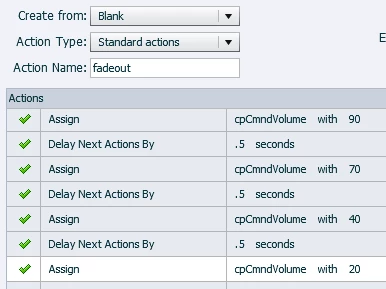
1. I have it on my first slide and it runs until slide 16. That's OK, I just copied and pasted and started it again on slide 17. However, I can't get it to fade out. I put a fade out on the object and it just abruptly stops on the last slide. Why is this so complicated?
2. If the adding audio to an object solution doesn't work, what is my workaround?
I have spent a ton of hours trying to figure out how to add background music. I am obviously frustrated and need a solution that will work. Thanks in advance for the help!



 AdChoices