
HuntersGold
Inspiring
February 13, 2018
Answered

Failed attempts not being posted to the internal server.

  • February 13, 2018
  • 1 reply
  • 404 views

Hi all,

I have a quiz that is failing to post all failed attempts to an internal server. All pass attempts (i.e. scoring above 80%) are being posted successfully but the failed ones are not.

The post results dialogue box is only appearing when a user has passed.

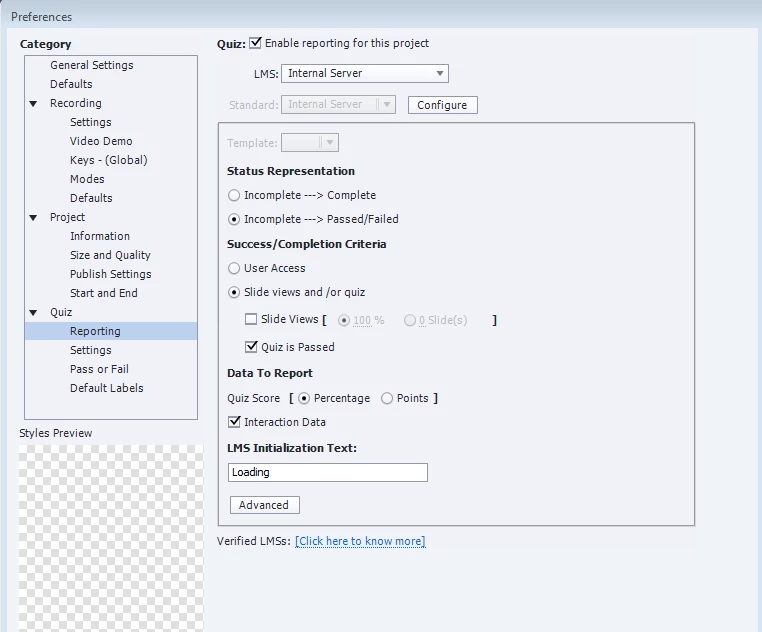
My preference are set as below? I'm not sure if there are any other settings that I need to implement for it to post both pass and failed attempts. Your input is greatly appreciated.

I am using Captivate 2017.

The reporting settings are as below:
Thank you

    This topic has been closed for replies.
    Correct answer HuntersGold

    Yes.  I would suggest you give that a try.


    Hi Rod,

    Thanks for your input.I have got it to work by following solution on this thread: fail quiz results not posting.

    I activated the quiz review button and all results i.e. failed and passed attempts are now being posted to the internal server. I don't understand how the quiz review button stop failed attempt scores from being posted?

    1 reply

    RodWard
    Community Expert
    Community Expert
    February 14, 2018

    Can you please show the screen for Quiz > Settings > Required drop-down?  Is it set to Optional?

    HuntersGold
    Inspiring
    February 14, 2018

    Hi Rod,

    Thank you for getting back to me. The required dropdown is set to "Answer All - The user must answer every question to continue." Please see screenshot below:

    Do you think it should be set to Optional?

    Many thanks

    RodWard
    Community Expert
    Community Expert
    February 14, 2018

    Yes.  I would suggest you give that a try.