
Gray Susan
Inspiring
June 21, 2018
Question

Failure to publish Assets when publishing in HTML5 only from CP9

  • June 21, 2018
  • 1 reply
  • 502 views

We are trying to publish a CP9 project in HTML5 only format and whether on the desktop or a shared drive get an error saying it can't publish the assets.
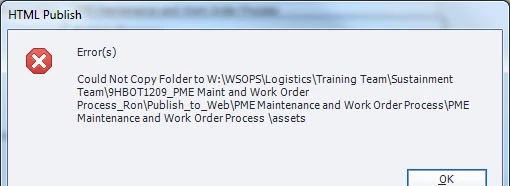
I'm hoping someone will have an idea that won't be recreating the whole project.

Thanks in advance.

Susan

    This topic has been closed for replies.

    1 reply

    Lilybiri
    Legend
    June 21, 2018

    It looks like you are working on a networked drive, which Captivate is not liking at all. You need to have not only Captivate but also the paths in Preferences to have on your system.

    Gray Susan
    Inspiring
    June 21, 2018

    We got the same error on a local drive before.  Just listed a different path in the error message.

    RodWard
    Community Expert
    Community Expert
    June 22, 2018

    This error message usually means you (or someone else) still has the content in that drive open in a web browser.  Since someone is still accessing the content, Captivate won't be able to overwrite the folder.  If you want to test this assumption, just change the publish location or the name of the output (so that it will be published to a different folder at that location) and try again.  If I am right, the publish will go through OK.