Participating Frequently
June 14, 2016
Question

Feedback Box Behind MCQ text

  • June 14, 2016
  • 3 replies
  • 725 views

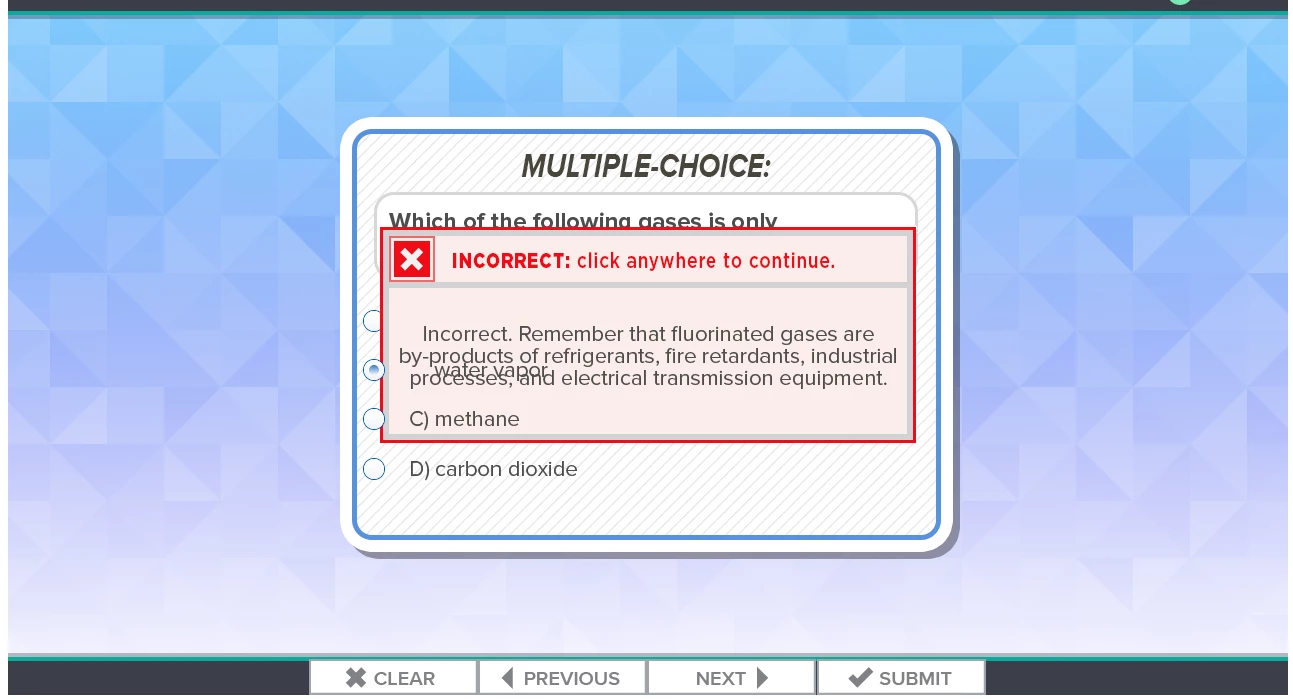
I have a MCQ slide.  No matter what I do the feedback answer displays behind the MCQ answer text when previewed in HTML.  It also displays under the question text.  As you can see in the image below it is not even all of the text.  It is random and some feedback may look alright but others are behind. I ahve tried 3 different ways. 1) I select and answer>properties, check advanced, No action, check show feedback message.  From here I have tried 3 different options. First, right click select revert to text caption.  I then select a .BMP that we have been using and am able to put text over.  2)All things equal for the second attempt but I created a .PNG that was hidden. Then selected action, show "incorrect_feedbackQ1".  3)I also tried just the normal feedback

text box that opens when "Show feedback Message" is checked and it also shows up behind the text.

Captivate 9.0.1.320 / Windows 7 Professional

Thanks in advance
    This topic has been closed for replies.

    3 replies

    Participating Frequently
    June 14, 2016

    Sorry here is the image

    Lilybiri
    Legend
    June 14, 2016

    I explained what I meant by 'embedded': those objects have no individual timeline, not in the quiz master slide, not in the quiz slide itself. That is the case for the buttons, the answers, the title, the question and the feedback captions or shapes. If you look at the quizzing master slide used for this question: do you see other timelines than the slide timeline? That PNG-image: is it merged into the background, only on this master slide or is it inherited from the main master slide?

    This looks so weird, which is the reason why I asked if you deleted some of those objects. It is really the first time someone reports such an issue and I'm on the forums since many years, daily.

    RodWard
    Community Expert
    Community Expert
    June 15, 2016

    Your best option is to just use the Feedback Captions or Shapes that come by default with the Quiz Slide itself.  They at least have a chance of being able to appear in front of other default quiz elements.  Any objects you add to the quiz slide will always end up being behind the default elements.

    Once you are using the default feedback captions, you can influence the stacking order via the Master Slide that applies to that type of quiz question.  On that master slide, select the feedback caption type (e.g. Success or Failure) and then use the Align toolbar buttons to bring it to the top of the stacking order.

    Another trick you can use is that the last default object added to a quiz slide usually gets added to the top of the stacking order.  So you can usually get the Success or Failure captions to be on top by first turning them off and then selecting their checkbox again to turn them on again.

    Participating Frequently
    June 14, 2016

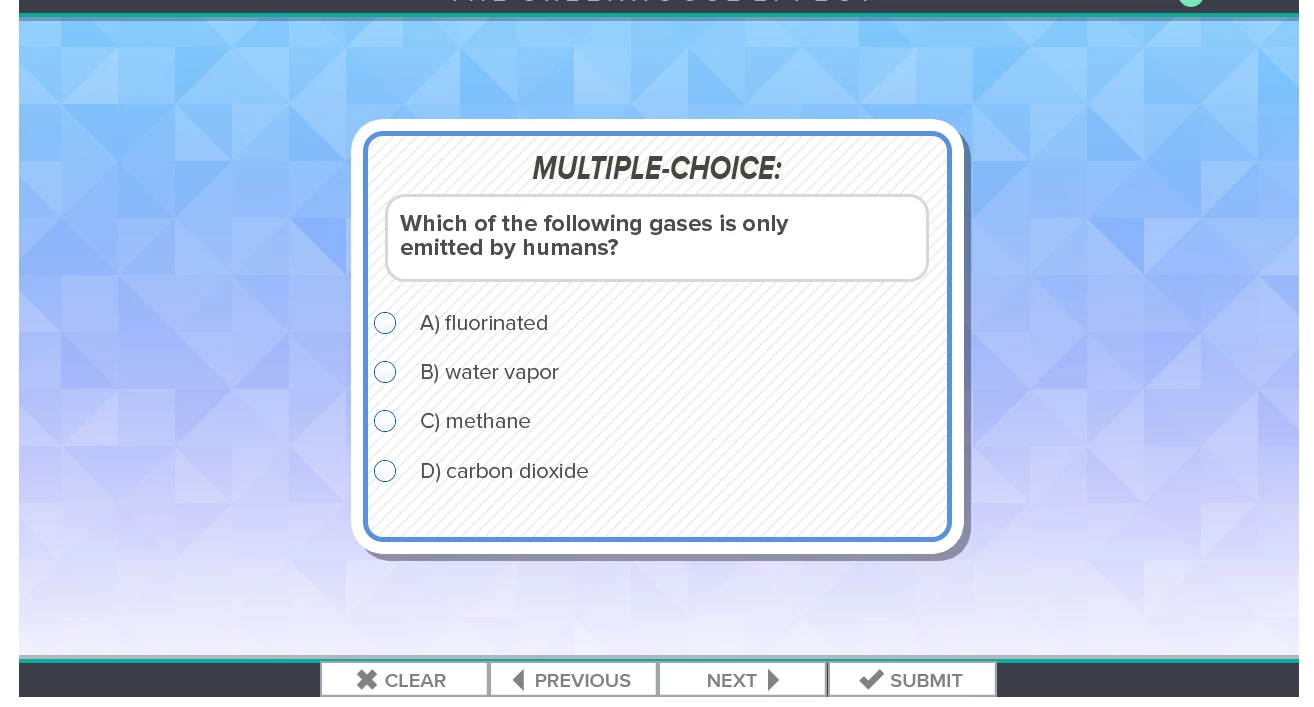
    Not sure what you mean by embedded.  I am new to Captivate sorry if I don't know the language.  Below is another example.  I am not changing anything.  I started with a new, blank project, Quiz>Question Slide>Multiple Choice.  Added a .PNG background to master slide.  Then I want different feedback for each of the 4 response so I go to properties>Options then I check "Advanced Answer Option" and click "Show Feedback Message". I made the feedback message bigger so it covers the answers and enlarged the text.

    Lilybiri
    Legend
    June 14, 2016

    All embedded objects on question slides are on top of all custom objects. Maybe this is what you are seeing. If you use the embedded feedback text containers (shapes or captions, doesn't matter) they will display on top of the answers. But from the screenshot this doesn't seem to be an embedded feedback at all, right? I am using the same Captivate version, both on Win7 and Win10. It is always dangerous to delete or mess up those embedded objects (they do not have a separate timeline, not in the master slide, not in the normal slides). Is this theme developed in Captivate 9 or is it an upgraded theme?