Participating Frequently
February 25, 2011
Answered

File Recovery..

  • February 25, 2011
  • 2 replies
  • 933 views

Hello all,

Captivate 5

I am encountering the same problem that a few of you have experienced with a project file not opening.  As seen here below:
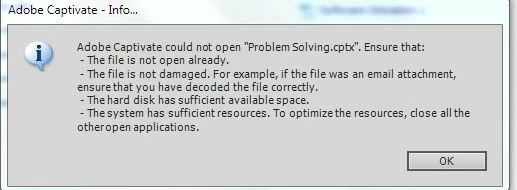
So I've read on the other discussions about the file recovery and I downloaded the cache tool.  I used it to find the cache, zip the folder and try to reopen the db folder but still no luck.  From there it freezes at the 90% mark when I'm openiong it.

Is there any other options?  I noticed that the file size is 5mb but the cache size is 78mb.  That seems enormous for a presentaion that is only about 15 slides.  This was my kick off Captivate project, so if there is any suggestions about file management or cache management, please, I would appreciate it.

Thank you,

Jaeson

    This topic has been closed for replies.
    Correct answer rsharma_champ_81

    Hi Jaeson,

    Did you zip the contents inside the project cache "db" subfolder?

    if that is not working then you may send the zip that you created to rahuls@adobe.com, I will seee why is that not working for you.

    Regarding the size differenece in cptx (5 MB) and the cache size (78 MB) I could say that you might be using some resource files in your project (e.g. images, audio, video etc.) All the files are kept in uncompressed form in the "Project cache" folder and thats why it is so big as compared to the .cptx file which contains only the compressed version of those resources.

    Regards

    Rahul

    2 replies

    rsharma_champ_81Correct answer
    Inspiring
    February 27, 2011

    Hi Jaeson,

    Did you zip the contents inside the project cache "db" subfolder?

    if that is not working then you may send the zip that you created to rahuls@adobe.com, I will seee why is that not working for you.

    Regarding the size differenece in cptx (5 MB) and the cache size (78 MB) I could say that you might be using some resource files in your project (e.g. images, audio, video etc.) All the files are kept in uncompressed form in the "Project cache" folder and thats why it is so big as compared to the .cptx file which contains only the compressed version of those resources.

    Regards

    Rahul

    J@esonAuthor
    Participating Frequently
    February 28, 2011

    Okay. I zipped the contents in the folder and not the db folder and that worked.  Thank you for the clarification and the information.

    Much appreciated.

    -Jaeson

    RodWard
    Community Expert
    Community Expert
    February 26, 2011

    When you zipped the folder, did you remember not to include the already_in_use.lock file inside the db folder?

    You need to ensure there are no locking files or folders in the final zip, otherwise you won't be able to open it.  If Captivate crashes, these files will still be present and Captivate will think the file is still open in another instance when you try to open it.