Inspiring
Mar 2, 2016 6:38 PM UTC
Answered

Fill-in-the-blank consistency

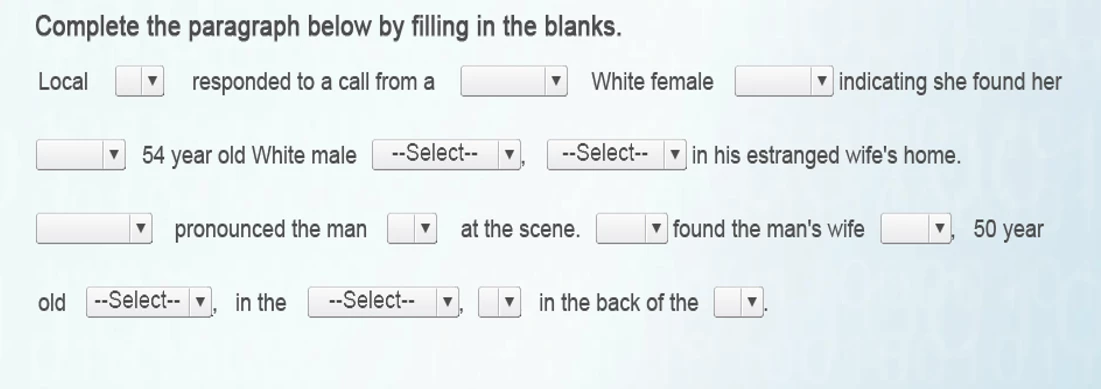
Captivate 8 - Any thoughts on why I am getting fill-in-the-blank box labeling inconsistencies - see screen image below? Some boxes have the "Select" text and others do not!
Thank you

    This topic is closed to new replies. Start a new post to keep the conversation going.
    Lilybiri
    LilybiriCorrect answer
    Legend
    Mar 2, 2016 9:29 PM UTC

    No, look at the length of the word '--Select--' which is more than 6 characters. Put the largest word on top of the list (will define the size of the box). I sometimes even add spaces before the word to force Captivate to create a larger box.

    8 replies

    Lilybiri
    Legend
    Mar 2, 2016 7:13 PM UTC

    It depends on the number of characters in the blank word. Small ones don't get that Select label.

    Translate
    deeb2400Author
    Inspiring
    Mar 2, 2016 8:35 PM UTC

    Some "small" blanks have at least 5 or 6 characters. Do you have any idea how many characters=small?

    Thanks

    Translate
    Lilybiri
    LilybiriCorrect answer
    Legend
    Mar 2, 2016 9:29 PM UTC

    No, look at the length of the word '--Select--' which is more than 6 characters. Put the largest word on top of the list (will define the size of the box). I sometimes even add spaces before the word to force Captivate to create a larger box.

    Translate