
Inspiring
May 2, 2016
Answered

Fill in the blanks question on Multiple words at once

  • May 2, 2016
  • 1 reply
  • 593 views

Hello,

I know there are other discussions on this topic but I could not find what I want.

I need a simple quiz slide with FIB and more than one word (with a drop down list each) on it.

a. I find it extremely difficult to get to the menu where you can type in the answer options ("blank"). I try clicking on the word or the dotted line but to no avail. What am I missing?

b. How do I add additonal words with a drop down list to an FIB slide?

Like:

"A ___ does ____ with a ____."

I don´t need partial scoring and I don´t want to use TEB or widgets as I don´t have much time left to program something like that.


Is there an easy way?

Thanks a lot.
    This topic has been closed for replies.
    Correct answer Lilybiri

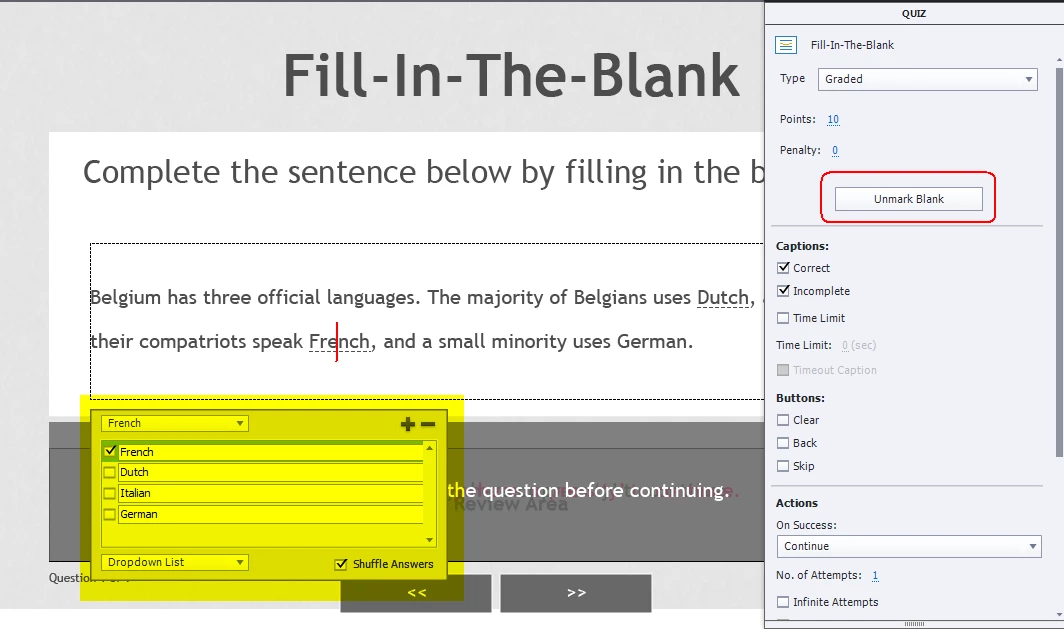
    You can mark any word or sequence of words as 'Blank' by selecting the word and clicking on 'Mark Blank' in the Quiz Properties panel (CP8 and CP9).

    The word gets a dashed underline. Click again on the word and the HUD appears with the typed word as first entry. Use the + sign to enter more possibilities for user input (all correct) or choose for Dropdown list and check in that case the possible correct answers, . I think it is wise to have the answers shuffled as well for that second scenario.


    Click outside of the HUD to close it. Select the next word and repeat the whole process. Have a look at this screenshot (for a second scenario with dropdown list):

    1 reply

    Lilybiri
    LilybiriCorrect answer
    Legend
    May 2, 2016

    You can mark any word or sequence of words as 'Blank' by selecting the word and clicking on 'Mark Blank' in the Quiz Properties panel (CP8 and CP9).

    The word gets a dashed underline. Click again on the word and the HUD appears with the typed word as first entry. Use the + sign to enter more possibilities for user input (all correct) or choose for Dropdown list and check in that case the possible correct answers, . I think it is wise to have the answers shuffled as well for that second scenario.


    Click outside of the HUD to close it. Select the next word and repeat the whole process. Have a look at this screenshot (for a second scenario with dropdown list):

    Inspiring
    May 2, 2016

    I see. That mark blank feature is not well explained.

    Thanks a lot.
    Well, forest for the trees I guess!

    Lilybiri
    Legend
    May 2, 2016

    Did you understand what I explained, or were you referring to the Help documentation (sighing....)?