


Participant
August 19, 2021
Question

Fill Outer Area in highlight box not an option in Captivate 2019

  • August 19, 2021
  • 2 replies
  • 259 views

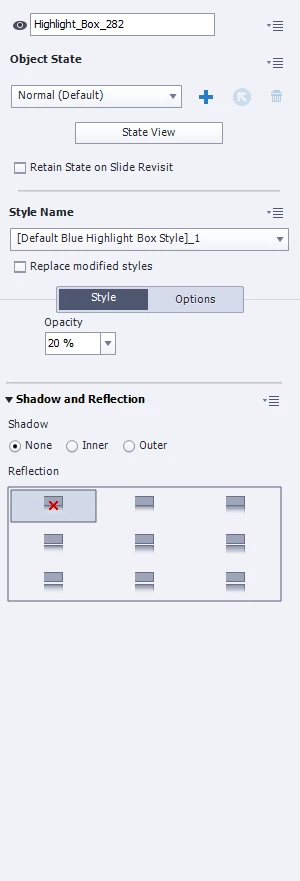
I have added a highlight box to my slide, and want to Fill the outer area. That option is not showing up in the Properties for the Highlight box. I click Objects, Highlight Box. It adds a blue box with 20% Opacity. I no longer have the ability to edit the Fill color, Stroke color and wideth, and no option to Fill Outer Area. And it makes no different which Style I select. 


This is in Captivate 2019.
This topic has been closed for replies.

2 replies

RodWard
Community Expert
Community Expert
August 20, 2021

What you should be seeing is this checkbox option.

Was this project created from scratch in Captivate 2019?

Try opening a new Blank project and then add a Highlight box to it to see if THEN you have the option to Fill Outer Area.  If the option appears in new projects but not in the one you have problems with, then you may have a corrupted project.

Lilybiri
Legend
August 19, 2021

Please check the full version number. You can find it under Help, About Captivate.

The present  - only supported version for Windows - is 11.5.5.553.


I am busy with a project and have used highlight boxes with outer fill area, so your problem is not appearing for me. 


There is a possibility that either the project or Captivate has corrupted. Can you try to clean the Preferences? Look for the subfolder 'utils' under the installation folder and run the 'CleanPreferences....' file while Captivate is closed. Restart Captivate and check if you have the full Style features back for highlight boxes.