

Fluid Box Dimensions Not Correct
Hi there,
I'm creating fluid boxes in Adobe Captivate 2019 and the dimensions don't seem to add up correctly.
I may have an incorrect setting somewhere or i may not be aware of additional padding or margin that is added in the background, but any help would be appreciated.
As seen below i have a fluid box setup in a master slide at 140x65px with 20px horizontal padding and 10px vertical padding. Then i have another fluid box inside this (not in the master slide) which is set to static so i can add an image. I assume the padding settings creates 20px padding to the left and 20px to the right, therefore the internal box should be a width of 100px but it is actually 116px wide. Similarly the height doesn't add up either (65 - 2 x 10 = 45, not 40).
Another issue that i noticed is that additional space in between the height is added when the static option is ticked. If i un-tick static, the height becomes 49px but this still doesn't add to the correct size.
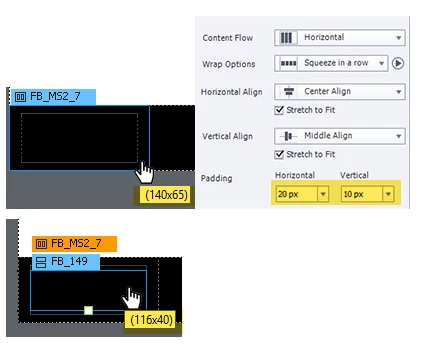
Please let me know if you have any solution to this
Kind Regards,
Shaun


 AdChoices