Participant
February 24, 2011
Question

Font color issue with animated text in Captivate 5

  • February 24, 2011
  • 3 replies
  • 1010 views

When I prepare a new animated text and open the property and then click the square to choose a color , I only get a  little part of the color panel (when I click the color box) and I have  no possibilities to enter the color code either:
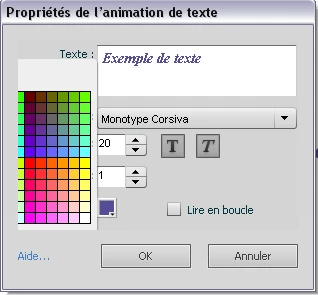
I'm working with a Windows XP, 64 bits desktop and I have Captivate 5 version 5.0.1.624.

Any ideas to solve this issue would be appreciated as it is becoming urgent for me.

    This topic has been closed for replies.

    3 replies

    valgouinAuthor
    Participant
    March 24, 2011

    Hello,

    I would like to let you know where I am now with this issue as it could be useful for someone else.

    I have made a Bug Report to Adobe and I also called the technical support. Meanwhile, I was working with an English Evaluation version (my license is only for the French version). They did not find a solution yet and my "call" was transferred to the advanced technical support. As the 30-day period for my English evaluation version was almost expired , the technical support gave me a way to work with my French version switched into an English version (This avoids me calling the Customer Support and changing my French license for an English one).

    I don't know if Adobe will solve this bug for the French version but I can now make Animated Text with any colour and that is all I need !

    Thanks to all people helping me with this problem.

    RodWard
    Community Expert
    Community Expert
    February 24, 2011

    @Lieve: You're on the French version of Captivate 5 aren't you?

    Can you provide a screenshot of what the Animated Text font colour dialog looks like on your PC and upload it here?

    This is what that box looks like for me:

    It seems that on this user's PC the colour picker isn't able to float on top of the dialog as it should.

    I encouraged Valerie to post her issue on this forum in the hope that one of the Captivate developer technicians would chime in with a possible solution.  I think this one has got to be some kind of bug due to a language version of Cp.

    Lilybiri
    Legend
    February 24, 2011

    Hi Rod,

    Not at all, I do use the English version. Why does everyone think that Belgians are all French-speaking Do not read on, because the rest of this post is because of my frustration.

    The majority in Belgium (more than 60%), Flemish like me, do speak Dutch. And English is for us much easier, although French is my second and husband's language. You should ask Birnou about this, he is French 'pur sang'. And there is also a French user forum,  not limited to one app, but it is here.

    Lieve

    RodWard
    Community Expert
    Community Expert
    February 25, 2011

    Sorry Lieve. My mistake.  I've never been to Europe and my wife watches too much Agatha Christie Inspector Poirot.

    I don't have a contact email for Birnou.  If you do, could you forward the URL for this thread so that he can chime in?

    Lilybiri
    Legend
    February 24, 2011

    Hello,

    There was a similar question on a Linkedin forum recently. I would recommend first of all to try to remove the Preferences folder, while CP is closed, and on restarting CP a fresh new folder will be created. This seems to solve possible corrupt settings. On XP this preferences folder is:

    C:\Documents and Settings\<USER NAME>\Local Settings\Application Data\Adobe\Captivate 5

    I do not know yet if this solved the issue, think it worth trying. Another user suggested uninstalling and reinstalling CP.


    Lilybiri

    valgouinAuthor
    Participant
    February 24, 2011

    Thanks for your help Lilybiri.

    I am the one who posted this issue on a LinkedIn forum earlier this week.

    Unfortunately, these two options (deleting the Preferences folder & uninstall and reinstall) did not help.