New_guy1
Inspiring
December 26, 2016
Answered

Font not adjusting when testing various breakpoints

  • December 26, 2016
  • 1 reply
  • 348 views

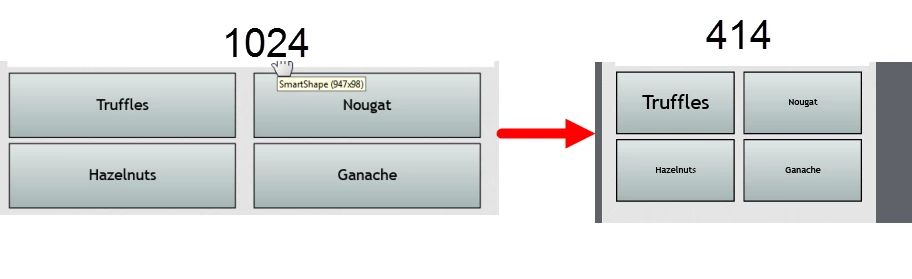
One of my fonts are not adjusting when I switch to another breakpoint?

Why is this happening? All the other fonts are correcting adjusting.  Truffles isn't changing!

Is there a video on this.  What is it called?

(See graphic).
    This topic has been closed for replies.
    Correct answer Lilybiri

    If you use a shape, you need to check/edit/create a shape style. Both captions and shapes can be text containers, but you have to use the correct style.  I strongly recommend never to override a style. You can create as many styles as you want for shapes.

    To check the presently used style for the shapes, select one and look in its Properties panel, under Style Name. The style is overridden if you see a +sign before the style name. Once you identified the style, you could look it up in the Object Style Manager.

    1 reply

    Lilybiri
    Legend
    December 26, 2016

    Can you check the Object style used?

    New_guy1
    New_guy1Author
    Inspiring
    December 27, 2016

    I went into EDIT menu, object style manager, this is what came up.  Or is there another method of checking.

    Even though I'm using smart shapes, when I selected that box, the default caption style appeared in the object style manager.

    Lilybiri
    LilybiriCorrect answer
    Legend
    December 27, 2016

    If you use a shape, you need to check/edit/create a shape style. Both captions and shapes can be text containers, but you have to use the correct style.  I strongly recommend never to override a style. You can create as many styles as you want for shapes.

    To check the presently used style for the shapes, select one and look in its Properties panel, under Style Name. The style is overridden if you see a +sign before the style name. Once you identified the style, you could look it up in the Object Style Manager.