

Dirlo
Inspiring
Dec 12, 2021 10:59 AM UTC
Answered

Format a french decimal number in US

...

Hello !...

I'm working on the volumes and try to make an automatic calculator in javascript !
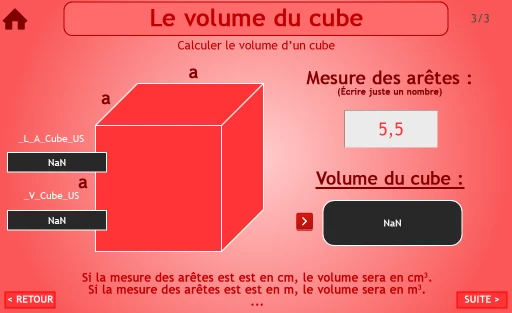
 

The problem is that I can't transform my french number with "," in a US format with "."...

So far (after researches on the net) I try :

1./

var _L_A_Cube_US = _L_A_Cube.toLocaleString("en-US");

var _V_Cube_US = (_L_A_Cube_US * _L_A_Cube_US * _L_A_Cube_US);

var _V_Cube = _V_Cube_US.toLocaleString("fr-FR");


2./

_L_A_Cube_US = _L_A_Cube.replace(' , ' , ' . ');

var _V_Cube_US = (_L_A_Cube_US * _L_A_Cube_US * _L_A_Cube_US);

var _V_Cube = _V_Cube_US.toLocaleString("fr-FR");


3./

_L_A_Cube_US = new Intl.NumberFormat("en-US").format(_L_A_Cube);

var _V_Cube_US = (_L_A_Cube_US * _L_A_Cube_US * _L_A_Cube_US);

var _V_Cube = _V_Cube_US.toLocaleString("fr-FR");


But none of them work as I want...

So, some javascript help is needed !...


Thanks in advance !...

😉

...

    This topic is closed to new replies. Start a new post to keep the conversation going.
    Stagprime2687219
    Stagprime2687219Correct answer
    Legend
    Dec 13, 2021 8:55 PM UTC

    Hmm...

    I am reminded of the High-Low card game where we ran into a similar problem.

    You may recall the formatting of the numbers issue we worked through.

    In the end - I stripped out the comma, converted to a number (multiply by 1), then - once I got the number I desired after performing calculations, used toLocaleString to get you back to a proper format.

    One of the issues we ran into was that formatting the space in the numbers required stripping the NARROW space versus a normal space.

    Once I realized my comma stripping was working fine, I was able to zero in on the NARROW space.


    Any chance of that going on?


    I played around a bit with this using the concepts from my High-Low Game.

    Give this a shot.

    I used the variables  of  side and  vol - just change them as needed.

    Hope this helps.


    // You could place this onEnter
    function stripComma() {
        side=side.toString();
        side=side.split("");
        for (i=0;i<side.length;++i) {
            if (side[i]==",") {
                side[i]=".";
                --i;
            }
        }
    }
    
    // You can place this code on your button to calculate the volume
    stripComma();
    side=side.join("");
    side=side*1;
    vol = side*side*side;
    vol = vol.toLocaleString(undefined);
    side = side.toLocaleString(undefined);


    16 replies

    Dirlo
    DirloAuthor
    Inspiring
    Dec 12, 2021 12:22 PM UTC

    ...

    I found a solution !... (The example number 2 of my previous post in fact !...)

    I just have to correct the first line with deleting a space !...

    _L_A_Cube_US = _L_A_Cube.replace(' , ', ' . ');

    😉

    ...

    Translate
    Dirlo
    DirloAuthor
    Inspiring
    Dec 12, 2021 4:10 PM UTC

    ...

    Pffff...

    It's seems to be not as simple...

    If the number is not decimal, the replace function doesn't work (normal !) but returns nothing...

    Still searching so...

    😉

    ...

    Translate
    TLCMediaDesign
    Inspiring
    Dec 13, 2021 12:01 PM UTC

    The problem is that you are trying to multiply strings, not numbers. That is what toLocaleString does.


    I can't really see how this is all supposed to work, if 5,5 is a product or entered. But you could make that a US number format by doing this,


    var num = "5,5";
    var _num = Number(num.replace(",", "."));

    Translate