
brunoB
Known Participant
September 9, 2017
Question

FULL SCREEN mode in SCORM 1.2 (html CP9 project) -and- Bookmark function OK - "Cancel"

  • September 9, 2017
  • 4 replies
  • 1969 views

Hello !

I hope your holidays have been excellent.

For two days, I try to solve two problems on my project:

  1. FULL SCREEN mode in SCORM 1.2 (html CP9 project)
  2. Bookmark function OK - "Cancel"  (The Bookmark function does not work correctly: When I close the module and go back again, I'll get a pop-up message "Continue where you stopped last time?" And I'll be redirected to the slide where I stopped last time even clicking the option "Annuler" If I click "OK", then it is working properly and I can continue from where I stopped last time)

Please see two captures images

Capture 1

Capture 2
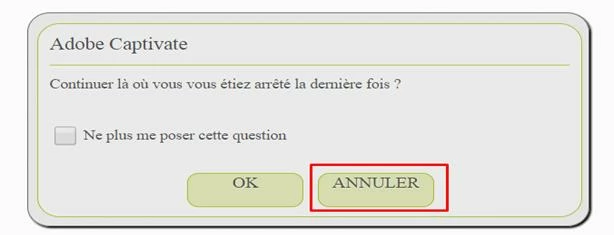
I have tried in every way to solve the matter alone, but I did not succeed, after 20 hours of attempts, I ask for help here, thank you in advance,

Good day and soon,

Bruno

This topic has been closed for replies.

4 replies

Erik Lord
Inspiring
September 11, 2017

oh, ok, great! I did not see that in this thread, but I believe you!

Could be a language-version thing...

I don't think it's an LMS issue because that dialog box should be 'hard coded' to send the user back to the beginning. So unless there's code at the beginning of the piece that sends the user back to the last screen...I don't know why it wouldn't work for Bruno.

Inspiring
September 12, 2017

I think it actually depends on how your LMS implements LMS Bookmaring. We use a Cornestone clone in my company and it seems to overwrite 'Self-Paced Learning', as I get the same results as Bruno with both, 'Self-Paced Learning' and LMS Bookmarking enabled ('Never Send Resume Data' unticked). Whatever the learner chooses on the dialog, he carries on where he left of. For this to work, for me LMS Bookmarking has to be switched off ('Never Send Resume Data' has to be ticked).

I ended up not using 'Self-Paced Learning' (the dialog looks ugly anyway) and instead creating my own 'Do you want to continue where you left off or restart?' prompt with SmartShapes and advanced actions.

brunoB
brunoBAuthor
Known Participant
September 12, 2017

Thanks a lot for your answers !
When you know how to program (with advanced actions or with javascript), you have no limits on these programs .. but "unfortunately" I'm not so good at coding... I still have many things to learn

I would like to inform you about news information on project, so see you,

thanks

___________________________________

Merci beaucoup pour vos réponses !

Effectivement quand tu sais programmer (avec les actions avancées ou avec javascript), tu n'as pas de limites sur ces logiciels.. mais, malheureusement je ne suis pas si bon à coder, au contraire j'ai encore beaucoup de choses à apprendre

Je vous tiens au courant sur la suite, merci

Erik Lord
Inspiring
September 11, 2017

On the SCORM resume/cancel concern:

I do not work with SCORM much these days and don't have a quick way to test. So fair that it may not be a bug in Captivate.

Bruno, let us know if 'Cancel' works as you expect in the SCORM Cloud.

If it does not, then I suspect a CP bug - in that 'cancel' does not return you to the beginning of the piece.

Or more specifically, if 'cancel' has the exact same result as 'resume', then it could be a bug.

It depends on what the CP behaviour *should be* if Cancel is clicked (but I'm pretty sure it should return you to the beginning, as you expect).

Let us know what happens in your SCORM Cloud test, and if anyone else reading has an opportunity to check that behavior in a course they may have available.

Lilybiri
Legend
September 11, 2017

Erik I have already confirmed in this thread that Cancel works as expected

for me. Only difference is that I am using Emglish version of CP and the OP

not.

Erik Lord
Inspiring
September 10, 2017

If you are pressing Cancel (Annuler) and the piece is still returning you to the bookmark, I would call that a bug.

That's not an LMS issue. The LMS is sending the bookmark back to Captivate, Captivate is asking if you want to resume to that location, but then is sending you there even if you click Cancel.

What do you want to have happen? If you click Cancel, what should occur?

brunoB
brunoBAuthor
Known Participant
September 10, 2017

Thank you Erik for your answer ! 

https://forums.adobe.com/people/Erik+Lord  wrote

If you click Cancel, what should occur?

In normal state (without bug, like the default action created by Captivate) if I choose the "Cancel button", on arrival at the first slide of the training e-learning (project 9).   And not the same action of OK button.

I hope.. I have answered in a clear expression, I'm available for further information.

Thank you,

Lilybiri
Legend
September 10, 2017

DId you try on SCORM Cloud as I suggested? It is the best way to know if this is due to the LMS or to Captivate. I have published many SCORM files from that version, and never had the problem you describe, why should it be a Captivate bug?

Lilybiri
Legend
September 9, 2017

For your first question: can you specify if this is a responsive or a normal project?

The second question: can you try it out on SCORM Cloud (you can test from within Captivate) to check if the problem is due to Captivate or to the LMS you are using?

Are you on 9.0.2.437, which is the latest version of 9?

This question was marked 'Assumed Answered', I did take that (wrong) status out. It is up to you to indicate when the question is answered.

brunoB
brunoBAuthor
Known Participant
September 9, 2017

Thank you for your answer Lieve and sorry for my reply (very late).

The project is responsive, and I have the same visualisation on the SCORM Cloud.  The version of CP9 is 9.0.2.437 (but no 2017).

I don't know what is 'Assumed Answered', because I don't speak english, I did take that like a secondary information (sorry..).

Thank you for all time,

Bruno