
Inspiring
February 10, 2017
Answered

Get name of element with JavaScript

  • February 10, 2017
  • 2 replies
  • 2907 views

Hi,

I´ve got the following problem:

I create a Captivate slide with an object called "triangle". This object is manipulated with JavaScript code (for example hidden, shown, ...).

However, if I copy the slide into another project where an object with the name "triangle" already exits, the object will be renamed by Captivate - for example into "triangle_127". This happens all the time, because the slide is a template slide for a larger project and is used several times within that project.

This causes the problem that the JavaScript code (for example \cp.show("triangle"); ) won't work anymore as the element is now called "triangle_127". Of course I could just adapt the JavaScript code and rename all objects in the code "by hand". However, this would be too inconvenient and time consuming because it's a huge project with long JavaScript codes.

So my question to all JavaScript professionals: How would you handle this problem? Which solutions do you suggest?

I use Captivate 9 (most recent version) and publish in HTML5. Any help is highly appreciated. Thank you very much in advance!
    This topic has been closed for replies.
    Correct answer TLCMediaDesign

    @TLCMediaDesign

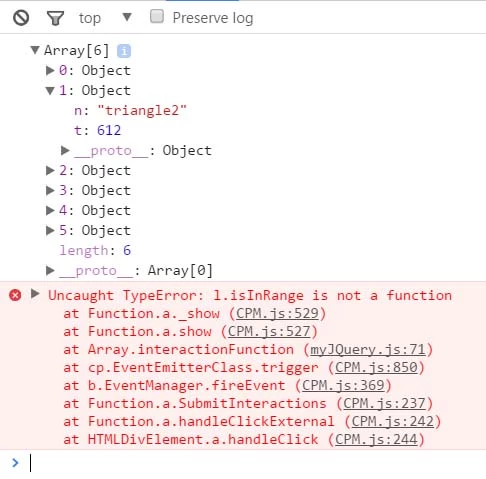
    I was testing Michael's use case and tried the code but could not get it to work.

    It's giving a console error "Uncaught TypeError: l.isInRange is not a function".

    On CP slide the Triangle smart shape is set to be "not visible in output".

    (The Triangle div appears in Elements in Chrome Dev Tools with visibility set to hidden.)

    FYI: In my test example I'm decided to click a button to display the triangle.

    Code

    for ( var i = 0; i < slideElems.length; i++ ) 

           { 

            if ( cp.model.data[ slideElems[ i ].n ].mdi.indexOf( 'triangle' ) != -1 ) 

            {

             cp.show(cp.model.data[ slideElems[ i ].n ].mdi);

                                                                /*

                                                                - No triangle displayed

                                                                - Console error "Uncaught TypeError: l.isInRange is not a function"

                                                                - Value must be "triangle2c" (see below)

                                                                */


             // triangleObject = ( cp.model.data[ slideElems[ i ].n ].mdi );

             // console.log("triangleObject = " + triangleObject);               // logs ".. = triangle2c"

             // cp.show("triangleObject");                                       // no triangle displayed, no console errors

             // cp.show("triangle2c");                                           // console error "Uncaught TypeError: l.isInRange is not a function"

             // cp.show("triangle2");                                               // SHOWS TRIANGLE


             // triangleObject = triangleObject.substr(0, triangleObject.length-1);  // remove letter "c" off end of "triangle2c"

             // console.log("triangleObject = " + triangleObject);                   // logs ".. = triangle2"

             // cp.show("triangleObject");                                           // no triangle displayed, no console errors                 

            } 

           } 


        }

    Console with "e.Data.si" and "error":

    myJQuery.js:71 relates to the following code:

          cp.show(cp.model.data[ slideElems[ i ].n ].mdi);

    I've have never looked in a CPM.js file so i wouldn't know what to look for or do.


    The loop you would want to use is this one:

    var slideElems = e.Data.si; 


        for ( var i = 0; i < slideElems.length; i++ ) 

           { 

            if ( slideElems[ i ].n.indexOf( 'triangle' ) != -1 ) 

            {  

              cp.show( slideElems[ i ].n ) 

            } 

           }

    In the example you tried, the cp.show was trying to show the "triangle2c" element, which exists but you want to show the "triangle2" element

    2 replies

    TLCMediaDesign
    Inspiring
    February 14, 2017

    You need to either include and external JS file, best method or include the script in the index.html just under the <script> tag.

    interfaceObj, eventEmitterObj;

    window.addEventListener( 'moduleReadyEvent', function ( e )

    {       

    interfaceObj = e.Data;

    eventEmitterObj = interfaceObj.getEventEmitter();

    initializeEventListeners();

    });

    function initializeEventListeners()

    {               

    if ( interfaceObj )

    {

    if ( eventEmitterObj )

    {

    eventEmitterObj.addEventListener( 'CPAPI_SLIDEENTER', function ( e )

    {                                                                       

    console.log(e.Data.si );

    });       

    }

    }

    }

    RodWard
    Community Expert
    Community Expert
    February 10, 2017

    Personally, I would be using the CpExtra HTML5 widget and @syntax or #syntax to allow objects to be hidden or shown simply on the basis of a keyword in their object names.

    http://www.infosemantics.com.au/adobe-captivate-widgets/cpextra/help/basic-concepts/at-syntax

    In the situation you describe, even if there was an extra string of numbers added to the end of the name of the triangle it wouldn't stop the action from being executed because the @syntax query would be looking for the word triangle in the ID name of any object.

    Inspiring
    February 10, 2017

    Hi Rod,

    thank you for the answer! I just see that the @syntax applies only on the objects of the current slide which is a really nice feature!

    However I need to be able to address the elements also with JavaScript code and not only with Advanced Actions as I have many algorithms which could not be implemented with AAs.

    TLCMediaDesign
    Inspiring
    February 10, 2017

    You'd need to run a script to loop through the elements on the slide a find the one that has "triangle" in the id. When you find that one put the reference in a variable and manipulate it that way.

    jQuery also has a method to do that for you.

    $('#cpDocument a[id*="triangle"]');