KariMueller
Inspiring
February 1, 2016
Answered

Get student FIRST name only from LMS to display in CP9 Scorm course?

  • February 1, 2016
  • 1 reply
  • 3222 views

Has anyone had luck getting the first name only to display in CP9. I'm not sure if I am doing something wrong or if it's just not possible.

I found this link and tried this method. When I downloaded the project included on the link and uploaded this into my LMS, it worked. The name displayed.

Display the Student's Name From Your LMS Using Adobe Captivate 6.x - CaptivateDev.com

However, when I tried to replicate the results in another project by coping and pasting the javascript to the slide on enter and creating the variable studentname with no luck.

I also tried the built in variable in CP9: cpQuizInfoStudentName, but this displays the Last name, First name and we would link only the first name.

Any help is appreciated.


Thanks
This topic has been closed for replies.
Correct answer TLCMediaDesign

Yes I can. Sorry to be so difficult. I think i'm just not understanding what exactly I need to do.

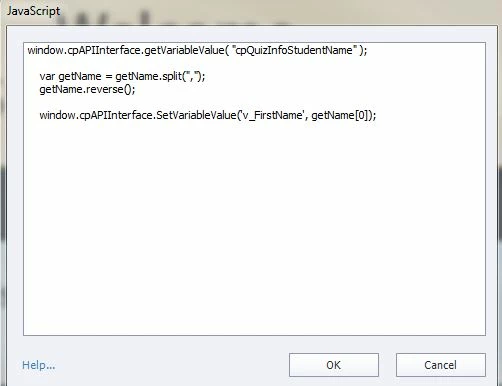
Here is the script window.

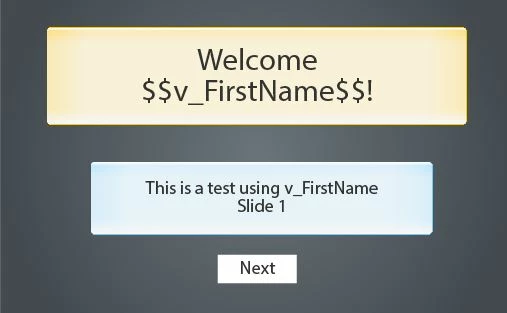
Then this is the slide where I inserted the variable. Was I supposed to leave it at cpQuizInfoStudentName?

When I put this in my LMS I don't get any name.


Sorry, busy and I made too quick of an edit..

var getName = window.cpAPIInterface.getVariableValue( "cpQuizInfoStudentName" );


var newName = getName.split(",");

      newName .reverse();

      window.cpAPIInterface.setVariableValue('v_FirstName', newName[0]);

1 reply

Lilybiri
Legend
February 1, 2016

The JS API changed a lot since CP6. That must be the reason. Can you paste the script here in a screenshot? Hoping that TLCMediaDesing, the JS expert, will pop in to help you translate that script to the new API

KariMueller
Inspiring
February 1, 2016

/* Calling a self-invoked function to not pollute the global scope and immediately destroy the scope chain */

(function(){

    /* Initialize JS Variable to hold the student name */

    var sName='';

    /* Obtain the student name from the LMS and put it into a JavaScript variable called sName */

    if (typeof window.GetStudentName==='undefined'){

        sName='Name Not Found';

    } else {

        sName=GetStudentName();

        if(sName==''){

            sName='Name Not Found';

        } else {

            /* Uncomment the below line to show the name in 'First Last' format */

            sName=sName.split(', ')[1] + ' ' + sName.split(', ')[0];

        }

    }

    /* Check for HTML5 vs. SWF output */

    if (typeof window.cp==='undefined') {

        /* We have SWF output, so Get the Captivate Object */

        var objCp=document.getElementById('Captivate');

        /* Set the studentName Captivate User variable with the JavaScript variabe, sName */

        if(objCp && objCp.cpEISetValue){

            objCp.cpEISetValue('m_VarHandle.studentName', sName);

        }

    } else {

        /* We have HTML5 output */

        if(cp.vm && cp.vm.setVariableValue){

            cp.vm.setVariableValue('studentName', sName);

        }

    }

})();

TLCMediaDesign
Inspiring
February 1, 2016

This will convert the cpQuizInfoStudentName:

window.cpAPIInterface.getVariableValue( "cpQuizInfoStudentName" );
   
    var getName = getName.split(",");
     getName.reverse();
   
    window.cpAPIInterface.SetVariableValue('YOUR_NEW_FIRST_NAME_VARIABLE', getName[0]);