September 11, 2013
Question

Ghost images

  • September 11, 2013
  • 1 reply
  • 671 views

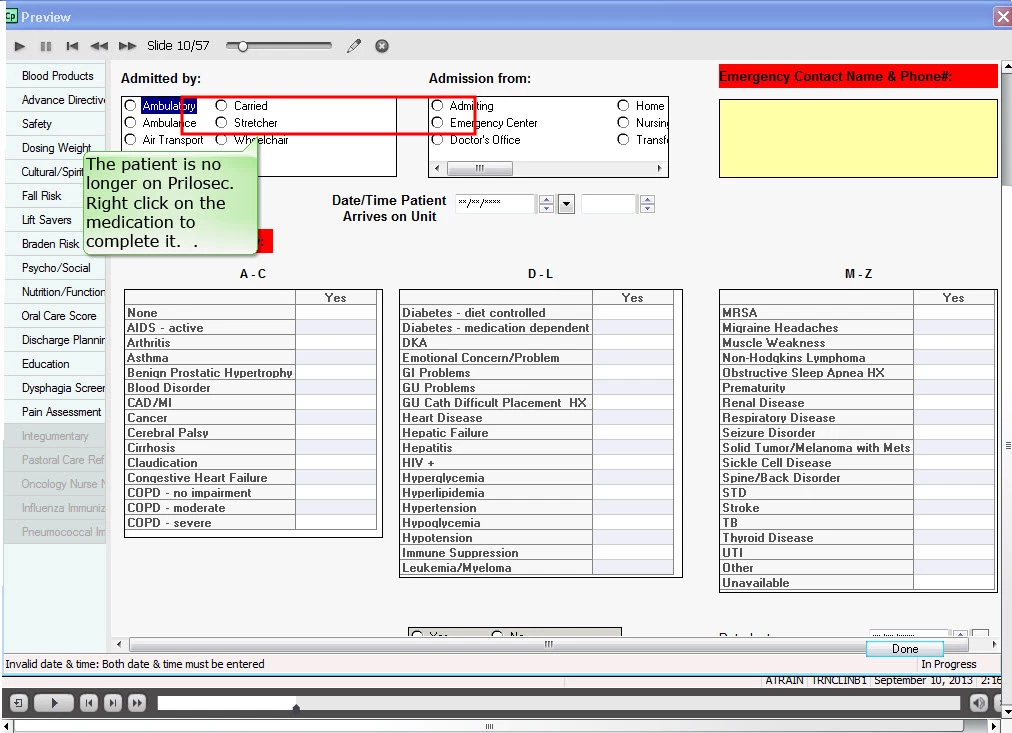
I am working in Captivate 6.  Sometimes when I preview my work I see images from previous slides on the next slide.  Usually I can close the project, re-open it and the problem goes away.  How do I keep this from happening in the first place.  I'm afraid the viewers will see it when it gets published.
This topic has been closed for replies.

1 reply

Legend
September 11, 2013

Change the slide quality (in the Properties panel) from Low (8-bit) to Optimized and check.

Sreekanth

September 12, 2013

I tried that and it worked while the presentation was open but when I closed the presentation and re-opened it the same problem occured.  Does this problem have anything to do with the timing length of the previous slide?

Legend
September 12, 2013

When the problem occurs again, is the slide quality on the individual slide still showing "Optimized" or did it revert to Low (8-bit) by any chance? (It is very unlikely that it will change though)

If it is happening after publishing, you can try by changing the publsihed swf quality settings in Edit > Preferences > Project > SWF Size and Quality. Deselect Retain Slide Quality Settings check box and ensure that the drop down list shows High (24 bit).