Known Participant
March 23, 2017
Answered

Ghost Lines in Published Scorm file

  • March 23, 2017
  • 2 replies
  • 2066 views

Was the issue of Ghost lines ever resolved? I am running the Captivate v9 Scorm through our LMS and all screens with white backgrouns have ghost lines. I have read all the threads and applied all the recommended settings.

Please advise

This topic has been closed for replies.
Correct answer RodWard

Apologies Rod for not anwering your question! I do have Scaleable HTML content checked and yes the content gets larger if I make the LMS window larger.
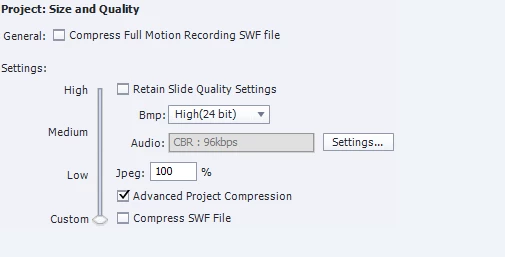
I changed to the above after reading some threads and it didnt resolve. I originally had it on High.

Thanks so much


Turn off Advanced Project Compression.  That particular setting is the MOST likely reason you have ghost lines in your content.  (I would have thought this would have been suggested in those other threads you said you had seen.)  If that resolves the issue, you may be able to turn on some of the other compression settings.

I would also suggest you turn OFF Scalable HTML.  Captivate content will look at its best when it is NOT being scaled.

2 replies

Participant
October 30, 2019

Hi Rod!

Unchecking Scalable HTML Content is not an option for me as my users use different size monitors. Is there another way to remove ghosting? Unchecking Advanced Project Compression did not work.

RodWard
Community Expert
Community Expert
October 31, 2019

Sure.  Just publish as HTML5.  No 'ghost lines' there.


Only the SWF output had a problem with 'ghost lines' and you should NOT now be publishing to SWF output any more because Flash-based content is pretty much dead in the water.

Participant
November 5, 2019

It's actually with html5 that I'm experiencing ghost lines. I've been publishing to SWF for five years and I've never experienced ghost lines with that format. But since we have to transition to html5, I have no choice but to deal with ghosting.


Any help you provide to get rid of this will be helpful!

RodWard
Community Expert
Community Expert
March 23, 2017

Are you resizing the content at all or is it being displayed at exactly 100% of captured size?

fremo101Author
Known Participant
March 23, 2017

I have recorded the exact size if my project 1280 x 720.

RodWard
Community Expert
Community Expert
March 24, 2017

I'm not talking about the recorded size.  I was asking if the content might perhaps be DISPLAYED at a resized or rescaled height and width. 

Do you perhaps have the Scalable HTML Content option turned on when you published?

If you drag out the corners on your LMS player window, does the content remain exactly the same size or does it get larger?

Can you show us how you have your Project Compression settings set up in Preferences?

