
Inspiring
March 26, 2018
Question

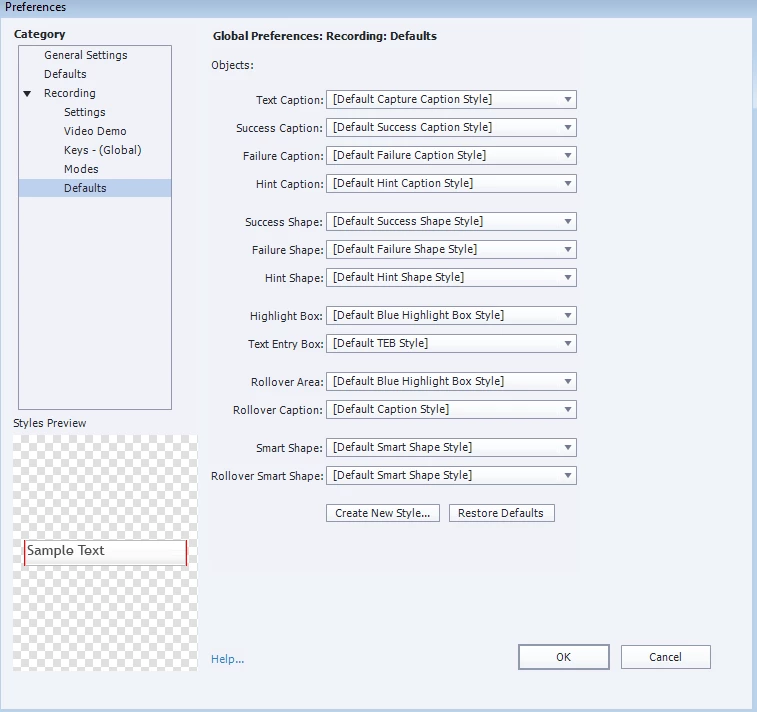
Global Preferences: Recording: Defaults

  • March 26, 2018
  • 1 reply
  • 1310 views

Hi there,

I would like to set up Global preferences for the Recording defaults so when I start a brand new Record a Simulation I have the customized captions.

I believe the Recording defaults go with the Theme, so if I create a project, then apply the Theme, I can see the customized Recording defaults.

However, if I open a brand new Record a simulation, I see the default Recording preferences.

Is there a way to apply the Recording defaults from a Theme to the Global Recording defaults?

Thanks in advance

Bobby
    This topic has been closed for replies.

    1 reply

    Lilybiri
    Legend
    March 26, 2018

    Did you try to export Preferences, if you cannot apply the same theme. Normally all settings in the Preferences can be exported and imported in new projects. Because Recording Defaults are also part of the 'design', they are also included in the Theme.

    Inspiring
    March 26, 2018

    Thank you for your reply Lieve, I think this is on a different level. Exporting the preferences will allow me to import them in an existing project. When one starts a new Software simulation, there is no project per se. The new Software simulation would automatically take the Global recording defaults. Actually, I am not sure the Recording defaults are exported with the Preferences. They are part of the Theme, not of the Preferences. I may be wrong of course

    Thanks again B

    Lilybiri
    Legend
    March 26, 2018

    Must confess that I didn't test it, didn't have time - my bad and not what I normally do.  You meay be correct because those choices use default styles which can be changed when switching to another theme. Maybe some one else can help you. Software simulations only use the Blank master slide. Do you use captions or shapes? What exactly do you want to preserve in all future projects?