
Participant
April 6, 2016
Question

Glossary template sound not working in Canvas

  • April 6, 2016
  • 1 reply
  • 167 views

Hello:

I created a glossary using the template in Captivate and attached an audio to each word. It works when I preview but once I publish and upload to our Canvas LMS, the sound is gone. However, I can here the click sound when I click on the continue and back button I created. Do you have any suggestions?

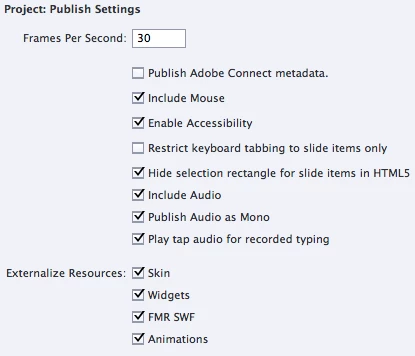
We thought it was a setting but we have altered all setting to what we thought needed to be set.
    This topic has been closed for replies.

    1 reply

    Lilybiri
    Legend
    April 6, 2016

    The glossary is a widget. I didn't try, but could you leave it embedded instead of externalizing?

    To test if it is due to the widget or to the LMS: did you upload to SCORM cloud to test?

    SpsonlineAuthor
    Participant
    April 6, 2016

    We published to our computer and uploaded as a SCORM file in Canvas.

    Lilybiri
    Legend
    April 6, 2016

    I asked if you did test it out on SCORM Cloud? You didn't tell which version you are using, but CP9 allows you directly to test it on that site. It is a great way to find out if the issue is with CP or with the LMS you are using.