


Chantelle Lyman
Participant
June 16, 2015
Answered

Glossary widget in Captivate 8 not displaying properly in HTML5

  • June 16, 2015
  • 3 replies
  • 5604 views

Hi,

I've created a glossary using the Glossary widget in Captivate 8. When I preview in HTML5, the widget automatically goes to the upper left hand corner of the screen and is partially cut off, no matter where I have it placed on the slide (right now it is supposed to be centered on the slide). See screenshot below.
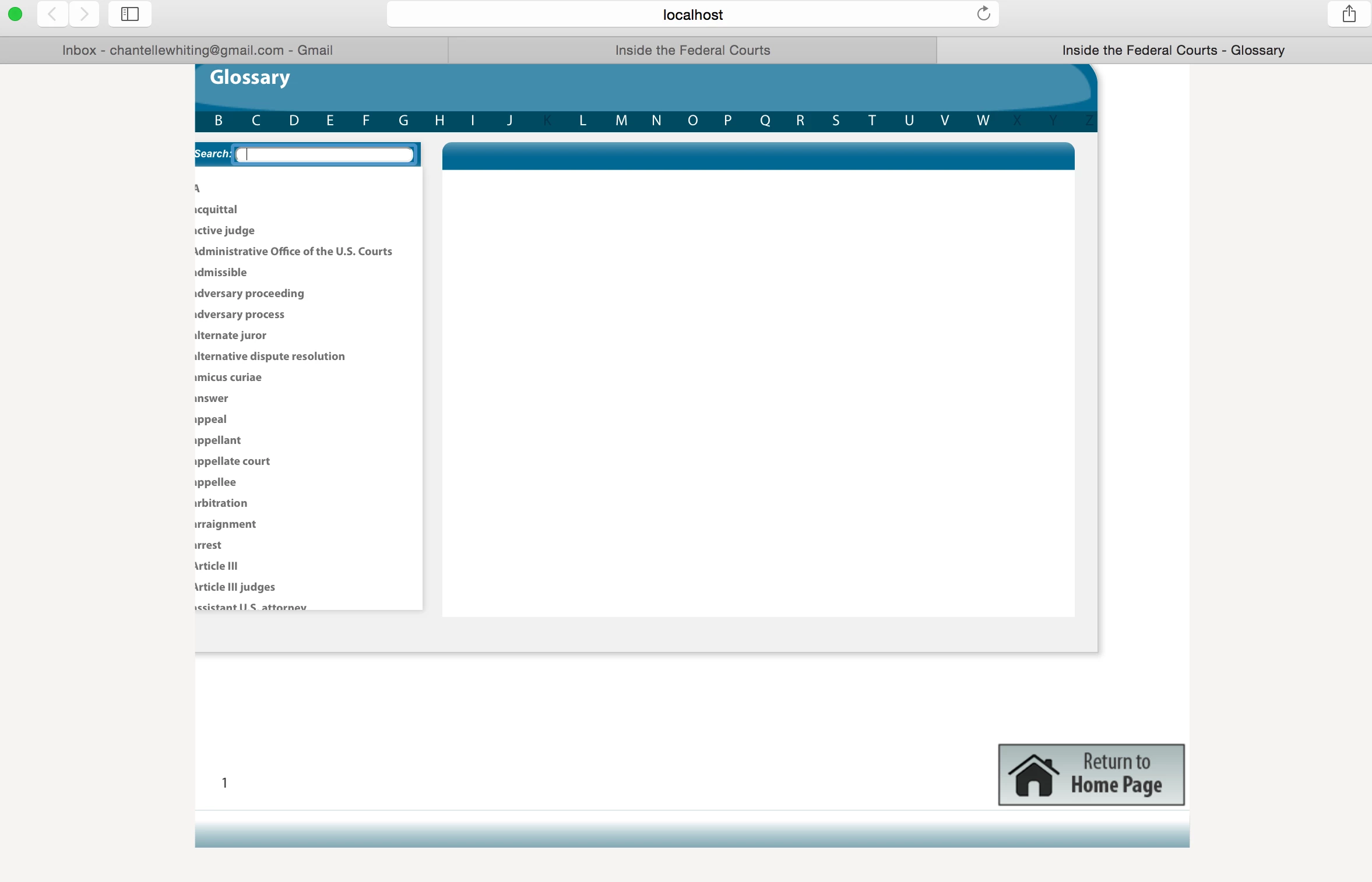
Any ideas on how to fix this? I need to publish in HTML5 for my client, so publishing in SWF isn't really an option. I'm using a Mac OS 10.10.2. Thanks for any help or suggestions!

This topic has been closed for replies.
Correct answer RajeevAdobe

@Lilybiri Please find the working glossary widget from the link mentioned below.

Dropbox - 08_Glossary.wdgt

Regards,

Rajeev.

3 replies

april650
Participating Frequently
August 24, 2015

When I use this widget, the screen flashes to a message for a second before going to the glossary slide.  The message says DIY elearning info Click each button for more information. Search: 

Any idea how to get rid of that?

Thanks,

April

Lilybiri
Legend
August 24, 2015

Could you get a screenshot of the message?

april650
Participating Frequently
August 24, 2015

This isn't an actual screen shot because it flashes and I can't pause it, but this is what it looks like.  The background it white and the Glossary appears after this flash.

april650
Participating Frequently
July 9, 2015

This works for HTML, but I need to publish SWF and nothing shows up.  the Widget in captivate publishes, but it shrinks to about 1/5 of the page and is unreadable.  Any suggestions how to get it to publish for SWF?

RajeevAdobe
Adobe Employee
Adobe Employee
June 16, 2015

Please check that you have the latest updates installed for Captivate.

Could you please provide me your contact details as a Private message.

I am able to reproduce this issue at my end.

I would like to provide you a new glossary widget and you may try to insert it into your project and check the HTML 5 preview.

Regards,

Rajeev .

Lilybiri
Legend
June 16, 2015

@Rajeev, why is it not possible to provide the working version of this

interaction to all users, please?

RajeevAdobe
Adobe Employee
RajeevAdobeCorrect answer
Adobe Employee
June 16, 2015

@Lilybiri Please find the working glossary widget from the link mentioned below.

Dropbox - 08_Glossary.wdgt

Regards,

Rajeev.