

Participant
July 8, 2024
Question

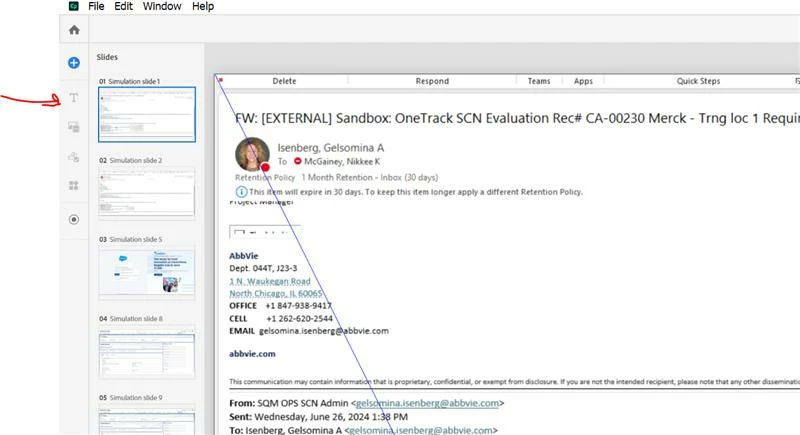
Greyed out menu in Captivate 12.3

  • July 8, 2024
  • 1 reply
  • 211 views

My menu on the left side is greyed out and will not allow useage.  Any fixes available? I have uninstalled and re-installed and restarted my computer. 
    This topic has been closed for replies.

    1 reply

    Lilybiri
    Legend
    July 8, 2024

    Are those software sim slides? You seem to use the new version, and you cannot add blocks to a sim slide. However you can add slides using the + button. On those slides, which are the real responsive content slides you can add media blocks, widgets.....

    Participant
    July 8, 2024

    oh wow you are correct. So in the recorded slides the menu is not active? 


    Lilybiri
    Legend
    July 8, 2024

    It is a bit embarrassing, don't want to explain in-depth. The software simulation in this version is mimicking completely how it is and was in Captivate Classic an all previous versions. The objects 'click box' and 'text entry box' do not exist anymore in the new version 12 and later.  Software sims are essentially not responsive really, and the new version created from scratch produces only responsive projects. This is some of a conflict situation because the terminology of the new version is not valid for the sim projects. If you only want a software simulation, in any mode, and responsive is not really the goal, I recommend to install Captivate Classic and use the simulations there. Workflow is identical, but UI is different. However you can add objects to the sim slides, edit the backgrounds using the Project library (no present in the new version) an a lot more. I would never create a sim in this version presently because due to the focus on responsiveness there is automatic panning and zooming also in Assessment and Training mode. I never use Demo mode because the Video Demo which is available in Captivate Classic delivers a much better quality and has a powerful editor.
