
Known Participant
August 23, 2016
Answered

Has anybody gotten Captivate Reviewer to work?

  • August 23, 2016
  • 1 reply
  • 540 views

I have several stakeholders that need to review my work, but I have yet to get Reviewer to work.  All I get is error messages.  

When I opened it up for the first time, it asked if I wanted to check for updates.  I clicked yes, and it said there was an error finding updates.  No explanation.

Every time I attempt to load one of the zip files of a project, I get this message:
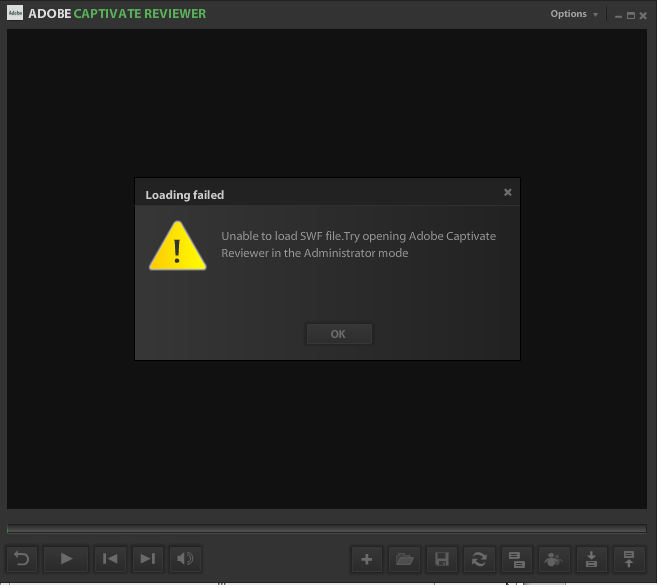
Reviewer Admin

I am the administrator and I have administrative rights on my desktop.  

I see nothing even mentioning Reviewer in the Community after 2013, and that's in reference to version 5.

Thanks for any help!

Jeremy
    This topic has been closed for replies.
    Correct answer Captiv8r

    Hello again

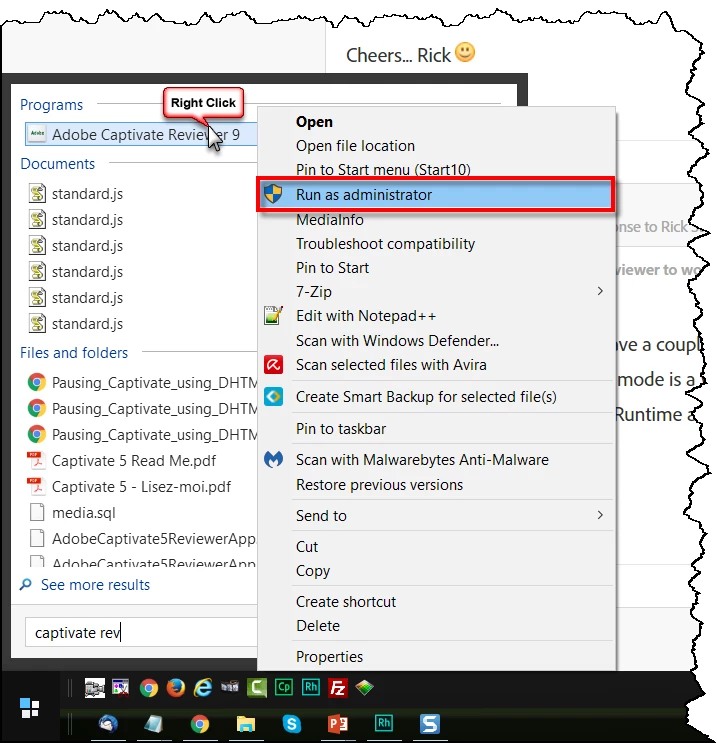
    Here is what I mean. You right-click the shortcut icon and choose to run as Administrator. And that's different than simply operating as an administrator.

    On your machine where Captivate is installed, I believe that the procedure of installing Captivate also installs for you the AIR runtime and possibly the Reviewer application.

    Cheers... Rick

    1 reply

    Captiv8r
    Legend
    August 23, 2016

    Hi there

    All your users as well as yourself will need to RUN the reviewer specifically in Administrative mode in order for it to work. This may require getting your IT staff involved so as to allow this to happen.

    Not only that, but each reviewer will also need the Adobe AIR Runtime installed as well as the Reviewer AIR application. Then they can open the CREV file.

    Sooo, bottom line is that you have a few hoops to jump through.

    Cheers... Rick

    Known Participant
    August 23, 2016

    Thanks Rick,

    Excuse my ignorance, but I still have a couple of questions:

    • I'm assuming Administrative mode is a Windows process (i.e., Start Menu > Search Programs > Run) ? 
    • I've downloaded Adobe AIR Runtime and published a project as a CREV file.  Still no dice.

    Thank you!

    Captiv8r
    Captiv8rCorrect answer
    Legend
    August 23, 2016

    Hello again

    Here is what I mean. You right-click the shortcut icon and choose to run as Administrator. And that's different than simply operating as an administrator.

    On your machine where Captivate is installed, I believe that the procedure of installing Captivate also installs for you the AIR runtime and possibly the Reviewer application.

    Cheers... Rick