
Known Participant
September 1, 2015
Answered

Help Displaying a Lot of Text in a Single Slide

  • September 1, 2015
  • 2 replies
  • 479 views

Hi,

I have encountered a couple of instances of needing to display a lot of text in a single text box or slide.

In the example below, I want the diagram on the left to be interactive, so when the user clicks on each of the blue boxes a text box appears that displays further information. The problem is that I only have enough room to display a few short bullet-points and need to display more information.
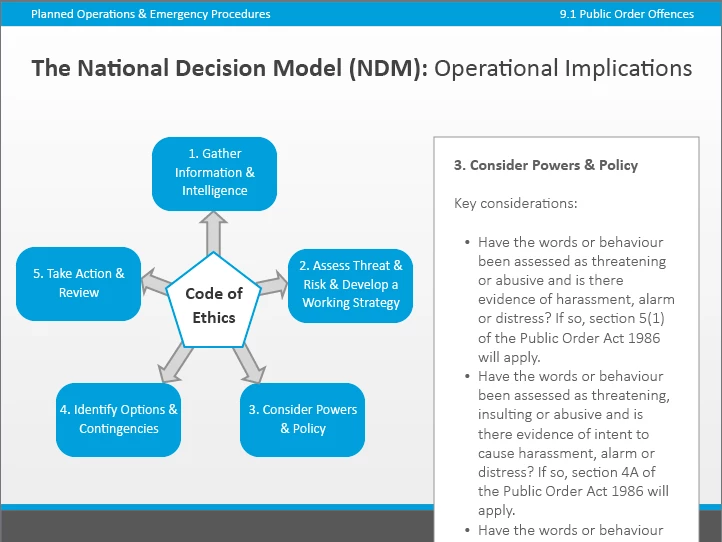
In trying to think of ways of displaying a lot of content in quite a limited space. Does anyone have any ideas of how I could achieve this?

Thanks,

Ross

    This topic has been closed for replies.
    Correct answer Lilybiri

    Use Scrolling Text Interaction instead of a text shape or caption. Or, link to a well-formatted pdf that you open in a separate window. Text captions and the interaction I talk about are much more limited concerning formatting.

    2 replies

    Known Participant
    September 2, 2015

    Hi,

    Relating to my original post above, I've encountered a situation where I have a true/false quiz question and I need to add quite a lot of text feedback to the Success and Failure captions. This is because the answers to some of the questions being asked need some quite detailed explanations.


    I'm therefore wondering what the best way of doing this would be? I can think of a few potential options:

    • Could I add next and previous arrows and navigate through lengthy feedback in steps?
    • Could I use a text scrolling widget as a Success/Failure caption and style it so it looks like the default SFH captions?
    • Alternatively, should I put detailed feedback on a separate slide and give the user the option to read the full explanation only if they choose to?

    Any advice would be greatly appreciated.

    Thanks,


    Ross

    RodWard
    Community Expert
    Community Expert
    September 2, 2015

    I'd use a separate slide.

    Known Participant
    September 2, 2015

    Thanks Rod, that seems like the most sensible option to me.

    Lilybiri
    LilybiriCorrect answer
    Legend
    September 1, 2015

    Use Scrolling Text Interaction instead of a text shape or caption. Or, link to a well-formatted pdf that you open in a separate window. Text captions and the interaction I talk about are much more limited concerning formatting.

    Known Participant
    September 1, 2015

    Ok thanks will have a look at these options and see what works best.


    Ross