Participant
Apr 19, 2021 9:13 PM UTC
Answered

Help Please- Captivate timeline

I'm a brand new student using Captivate for my very first project.

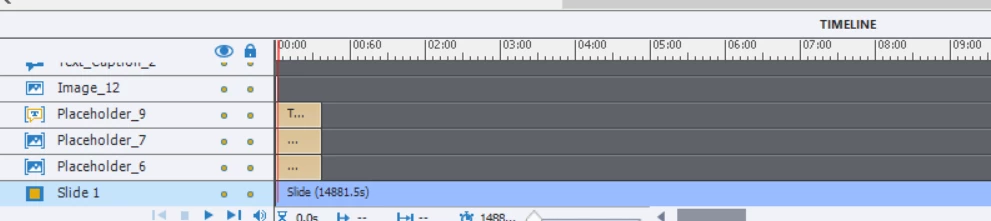
Somehow I accidentally compressed the timeline. Instead of 1 second by 1 second, it is showing by whole minutes. How can I change it back?


    This topic is closed to new replies. Start a new post to keep the conversation going.
    Lilybiri
    LilybiriCorrect answer
    Legend
    Apr 19, 2021 9:17 PM UTC

    Please read this blog:

    http://blog.lilybiri.com/captivates-timeline-s-demystified-intro

    You need to drag the slider at the bottom to zoom out.

    4 replies

    Participant
    Apr 19, 2021 9:36 PM UTC

    Never mind- I figured it out. It was the zoom feature but it was locked because I had locked objects. Once you unlock the objects, you can change the zoom feature again. Beginners troubles!

    Translate
    Lilybiri
    Legend
    Apr 20, 2021 7:19 AM UTC

    Thanks for the heads up, but you didn't show any locked object in the screensho!

    Translate
    Lilybiri
    LilybiriCorrect answer
    Legend
    Apr 19, 2021 9:17 PM UTC

    Please read this blog:

    http://blog.lilybiri.com/captivates-timeline-s-demystified-intro

    You need to drag the slider at the bottom to zoom out.

    Translate
    Participant
    Apr 19, 2021 9:36 PM UTC

    Thank you!

    Translate