
A__Innis_Neill
Participant
September 14, 2017
Question

Help! Text-options missing in Captivate 2017

  • September 14, 2017
  • 2 replies
  • 897 views

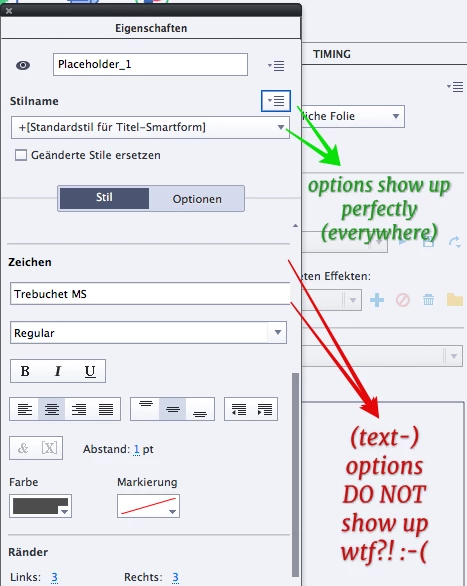
I have this nasty problem on Macbook (Pro & Air), that Adobe Captivate 2017 Release doesn't show part of the preferences inspector properly.

This concerns only the text options!

Everything works perfectly, (even on the Macbook Air 11" wich is slightly smaller than required for CP) except the options for text and the button that opens the list of fonts. This means, I need to scroll through all my fonts manually and slowly to find the font I want. This makes work so much slower 😕😕

Please, does anyone know of the problem and has a solution?
This topic has been closed for replies.

2 replies

Participant
November 16, 2017

Was a resolution ever found for this?

I have a similar problem in Captivate 9 on my Windows 10 PC despite uninstalling and reinstalling. I have now permanently uninstalled Captivate 9 and installed Captivate 2017. I still have the same problem as before.

It makes working with Captivate almost impossible as key buttons are missing. Here are just a few examples of affected screens:

In this last one I have Library ticked but it's not visible anywhere and half the properties panel is 'off screen' meaning that items can't be selected.

Please help - this is the only programme I have an issue with on this PC. PhotoShop works fine for example.

Lilybiri
Legend
November 16, 2017

What is the resolution of the screen and the Display Percentage, please?

Participant
November 16, 2017

THANK YOU!

I just went to Display to check and saw something I haven't seen there before which said Remove custom scaling and sign out.

No idea where that came from but I took a punt, did it and now Captivate is working fine so thank you.

(also I feel like an idiot but I swear I checked resolution last time when this happened with Cap 9)

RodWard
Community Expert
Community Expert
September 14, 2017

You've selected a placeholder object.

Select a normal Shape or Text caption and then see whether the options appear.

Lilybiri
Legend
September 14, 2017

Even for Placeholder objects those options should appear, but they are cut off. It looks like part of the UI is missing to the right part. SInce I'm not a Mac user, have no idea about any advice.

A__Innis_Neill
Participant
September 14, 2017

Thank you both, but it doesn't matter whether it is a placeholder-text or a plain simple text caption. :-/

Also I've tried re-install, custom workspace and un-dock the properties inspector. No change.

Yes, it seems part of the UI is missing. I've also reported it as a bug months ago, but probably there won't be a fix this year ... hence I'm taking a chance and ask  if someone knows the solution ...