Participating Frequently
June 25, 2024
Question

Help with a Memory Game

  • June 25, 2024
  • 1 reply
  • 520 views

Hi all, 

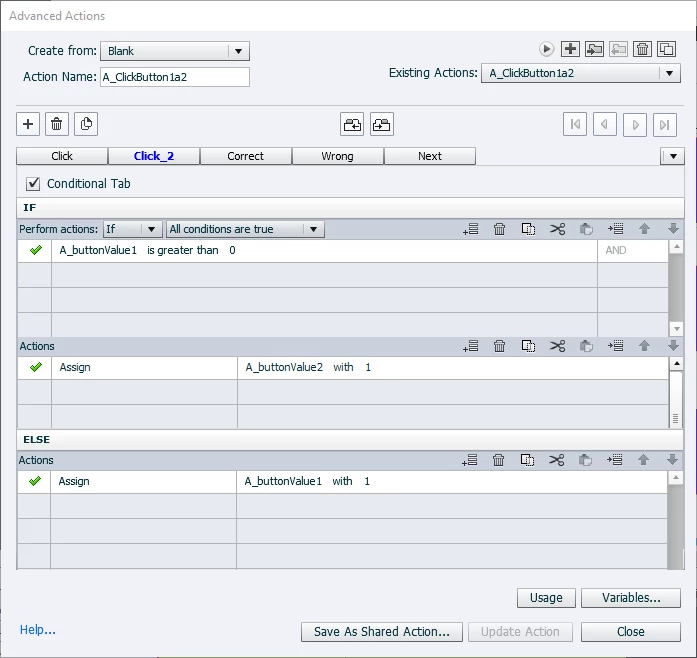
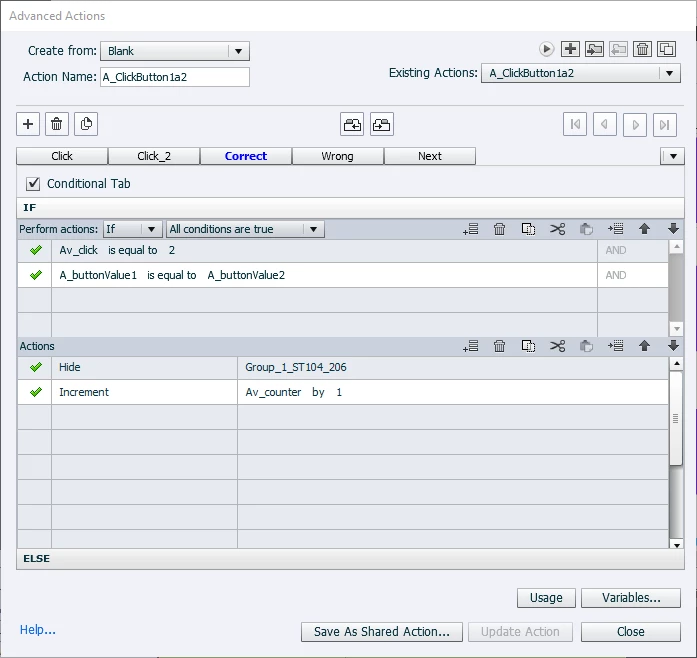
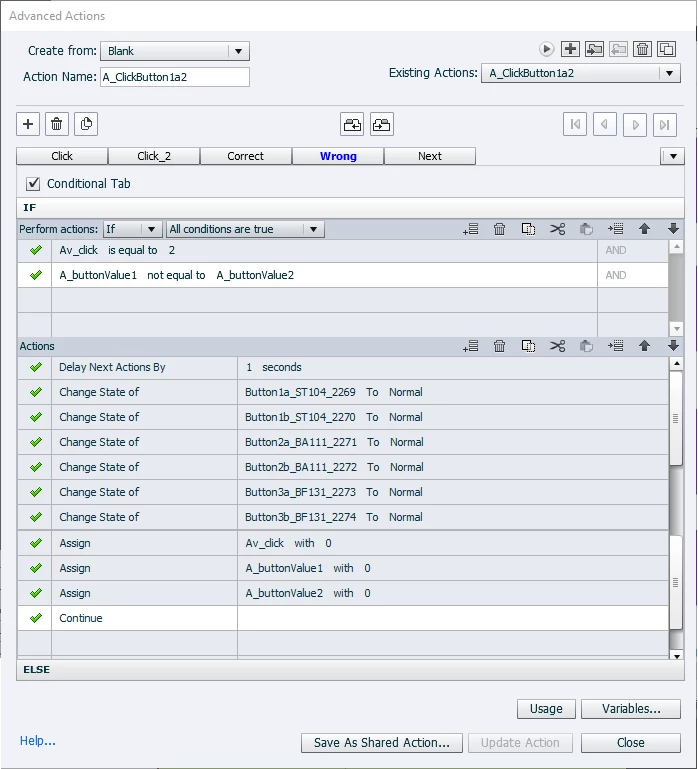
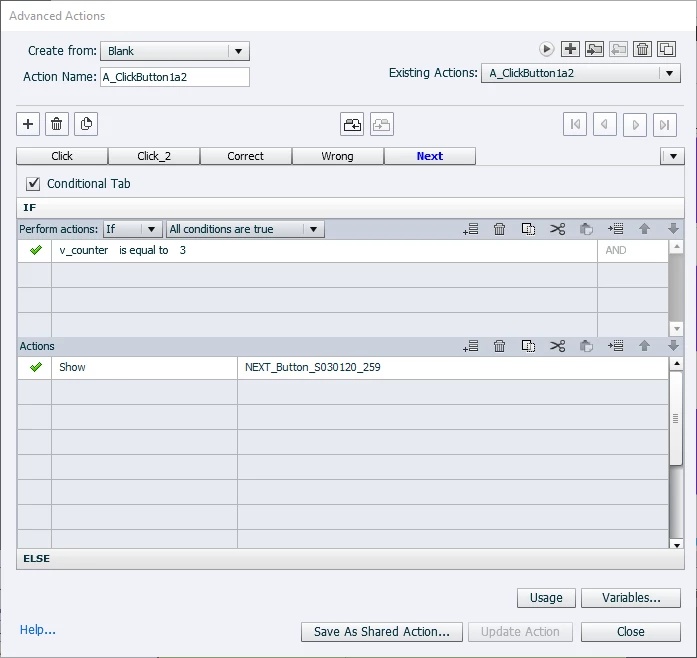
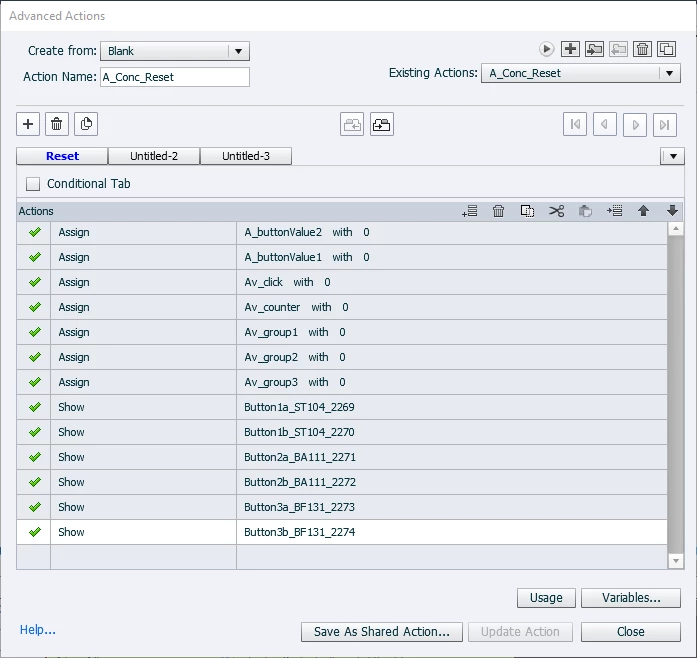
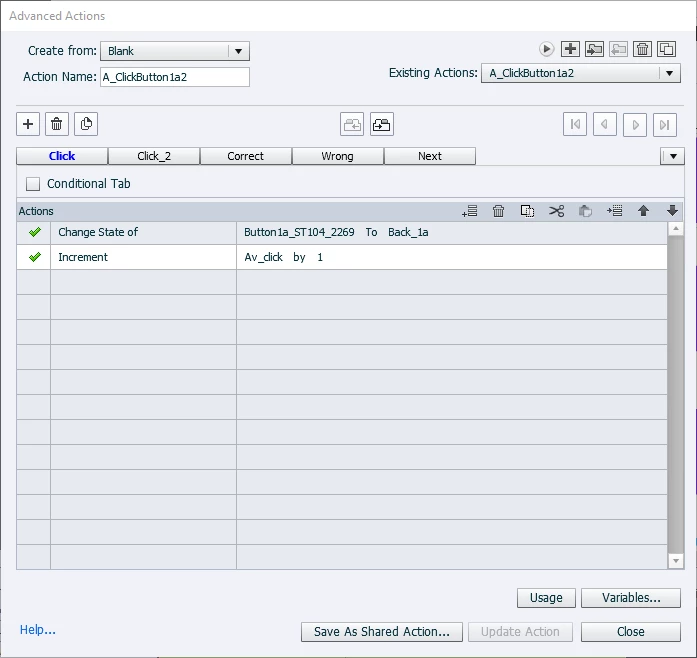
I'm hoping someone can help me figure out what I'm doing wrong.  I've been trying to create a memory game and I keep running into issues with the code/logic for resetting after an incorrect match.  I read this post https://blog.lilybiri.com/memory-game-setup-version-2021 and followed the directions but the cpCmndGoToFrameAndResume didn't seem to reset anything. The cards turned over and never turned back. I've read so many blog posts and tried many different variations but couldn't figure out a fix.  So I tried another way and this one is also *almost* working.  Everything is fine when you don't get a match - the cards show the back and then turn over.  And the 1st time you get a match, it works as expected - the cards show the back and then disappear.  But after the 1st match it breaks. The cards will still flip to the back but they never turn back over or disappear - whether the match is correct or not.  Here is an example of all my advanced actions (there is one for each card) plus the reset adv action.  (Note that I edited the images so you can see everything at once.)  Any thoughts would be appreciated.  


    This topic has been closed for replies.

    1 reply

    AGBeecherAuthor
    Participating Frequently
    June 25, 2024

    Forgot to add the timeline . . .


    Lilybiri
    Legend
    June 26, 2024

    You are referring to one of my game blog posts, but apparently not following fully the indications there. I did use only ONE shared action, not a bunch of duplicated advanced actions. If I have some more time today later on, I will try to figure out the advanced actions you used contrary to my workflow. It would have been easier if you posted images of the actions Preview window instead of the multiple screenshots you now used. You open the Preview window using the first arrow button in the AA dialog box. It is especially useful when you have multiple decisions and/or conditional decisions, although it is a shame that you cannot increase its size. More details in:

    Advanced Actions Dialog box in Captivate 2017/2019 - Captivate blog (lilybiri.com)

    Even the timeline is much more convoluted. Do you have an audio clip? That woudl be the only reason for having such a long duration of that slide. Two of the button timelines are anchored to the end of the slide timeline? Why? 

    My Reset action was meant to reset everything on the slide by re-entering the slide. If the 'Retain state....' is not activated for any multistate objects,  that would get all multistate objects back to the Normal state. More in:

    Replay or Reset slide? - Captivate blog (lilybiri.com)


    AGBeecherAuthor
    Participating Frequently
    June 26, 2024

    Hi again.  Thanks for the comments.  Yes, you are correct - the slide does have audio, which is why it is longer.  And I'm using Advanced Actions instead of a Shared Action because I'm still new to Captivate and I feel like I have more control when I can edit each AA.  Good call on the Preview window.  I couldn't find it before, but here is a copy.  I broke up the image - hopefully more legible

    As far as the anchored buttons, there's no reason.  I think they probably got anchored when I was resizing and I didn't bother to fix them.  Would that prevent the slide from resetting properly?  (I took off the anchors but it doesn't seem to make a difference.)

    And the "Retain state . . ." button is NOT checked for any of the buttons. I did read your post about this and also still have a copy with the game code you posted, but it wasn't resetting either - which is why I tried to change my approach.    Here's a preview from one of the buttons in that original version.  I did also use the advanced actions instead of a shared action, so each button has this code. I'd be happy to fix either one - just need 1 working version.