Question
Help with States & images
Hi all,
I need some help please, i'm very new to Captivate!
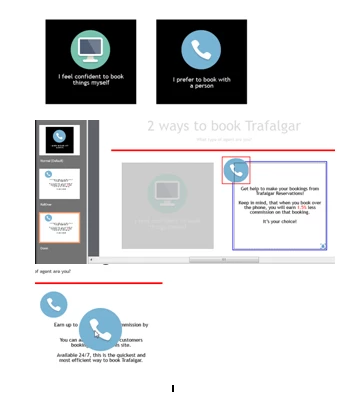
I have created a slide and want to use the State View to reveal text behind images.
On the screen shot below - you'll see i have 2 black smart shapes and have put an image on each. The one on the left (green image) works perfectly!
Yet the one on the right - blue image - doesn't!!
The central blue image is supposed to disapear in rollover or down state as shown on the middle image. and yet in preview mode (base image) it's still there in the centre and covering the text.
Any ideas appreciated!
 AdChoices