Justenuf2bdangerous
Inspiring
April 28, 2014
Question

Hey, Adobe? A simple, heartfelt request from an accessibility driven designer

  • April 28, 2014
  • 2 replies
  • 1605 views

First - I adore Captivate, anyone wishing to troll the product please start your own thread.

Now - my  heartfelt request - which has already been sent a a feature request. (I ask those who also work in accessibility environments to add this request from their accounts as well, the more requests, the better our chances for the feature)

Tab ordering for the buttons was an awesome upgrade, but why did you stop halfway to perfect? Flash allows the developer to set the tab index for ALL the objects on the screen - text, image, animation, movie clip, navigation controls, etc) by simply assigning a number in the accessibility menu:
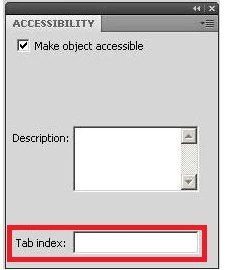
Add this to Captivate and almost every workaround and kluged fix (including seven tab, ten entry per tab conditional actions) I have had to slap on an otherwise simple and elegant project files disappear. Rollovers and feedback boxes are simply inserted into the reading order without a fuss. Long winded and boring slide notes that are read without pause by screen readers are replaced by easily digested elements that can:

Provide multiple ways to operate the technology and retrieve information so that users can choose alternatives based on their physical capabilities.

Provide support for the assistive technology (AT) that people with disabilities use for improved accessibility.

Ensure that all users have equivalent access to all the information conveyed.

In short, we can give the user a much higher quality, more engaging an interactive experience (read: not just a text equivalent, although it could still be an option) that better reflects the capabilities of eLearning, regardless of their sight,  hearing and/or mobility impairments.

If you think this might be valuable, send a feature request to Adobe.

If you're one of the Adobe folks assigned to monitor this forum - how valuable would this fix be when marketing this to a government agency anywhere in the world that insists on accessible materials?

Justenuf

This topic has been closed for replies.

2 replies

Justenuf2bdangerous
Inspiring
May 18, 2015

Nope- your response shows a perfectly good understanding of the way the interaction works. My only thought was that a tablet computer might default to touchscreen commands even with a keyboard attached. If you run it on a desktop and still don't see the box, I am at a loss on this one. I can't recreate your issue with the parameters we talked about here. Hope someone else has more insight. Wish I could be of more help.

Justenuf

Participating Frequently
June 17, 2014

I want to ECHO what you just said. I am having so much trouble with this right now, and you are right, I work for a government agency. I have lost days trying to fix all the anomalies.

I have a question for you, and hope you have stumbled across this before. The tabbing to my interactive objects is working fine. Beautiful in fact and I am getting them in the tabbing order I require. And then on a number of my slides the tabbing is also going to the normal text boxes, graphics, even the screen. It does this in both the screen preview or if I publish. So although the interactive aspects are in the right order, the poor learner has to tab through everything else on that slide also.

I have ensured that the default auto label in the accessibility menu for the item is unchecked and that it is not given a name manually in that menu.

I have tried different types of text boxes, but it still does it. It does it to everything on the slide. How can I get it to just focus on the interactions and tab through them ignoring anything but them on the slide? I must bring all our e-learning into 508 compliance and am already behind my tight deadline trying to figure all this out. I am using Captivate 8.

Help! I'm desperate.

Justenuf2bdangerous
Inspiring
June 18, 2014

Deborah:

The only time I've run into the specific issue you've described is when I have inserted an interactive(widget) on a slide.The widgets seem to make everything on the slide read as an interactive - reported this to Adobe a couple of months ago as a bug - feel free to follow up with another request as well. The only way I was able to get it to stop was by deleting the widget and creating a similar interaction using buttons and advanced actions in its place. I didn't see anything dealing with this in any Cp8 threads, or otherwise - I hope this at least gives you a place to start looking.

Justenuf

Participating Frequently
June 18, 2014

Wow... firstly thank you for such a prompt reply. Secondly you nailed it! The problem is on the slide where I have inserted the Ask the Expert Widget. So it appears this bug has continued over to Captivate 8 then without being addressed. Now this completely limits my ability to use any widgets and still remain 508 compliant. Wow.

Thanks again for being so prompt. You have saved me hours of struggle trying to figure this out.

Deborah