Known Participant
February 11, 2019
Answered

Hidden buttons still active!

  • February 11, 2019
  • 1 reply
  • 689 views

Dear all,

on one of my slides, I have several buttons showing lightboxes.

Each lightbox is made of several elements (smartshapes, text, image..) and is covering the totality of the slide.

BUT, even if you don't see the buttons anymore, you can actually click on them.

Can someone explain me why and how I can stop this behaviour?

Thanks a lot

Céline

This topic has been closed for replies.
Correct answer RodWard

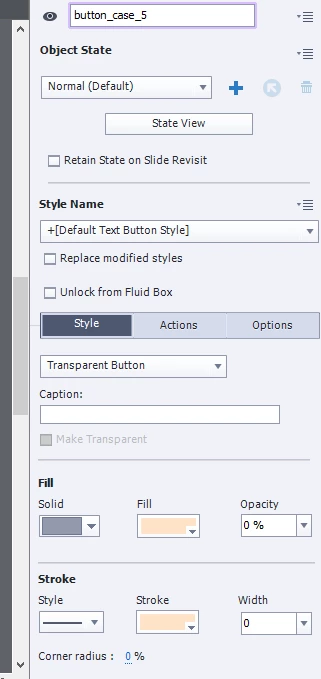
this is the type of button I'm using and the lightbox which it opens

By disable/enable, you mean in the "advanced actions"?

that would mean that for each button, I have to add the action to disable the others buttons, then on the popup closed button, add the advanced action to enable the buttons, right?

Knowing that I have 10 buttons, I'm looking for something easier. In Storyline, there is an option to actually hide what is below an object and by hiding is meant: you don't see it anymore and you cannot click on it anymore. I'm looking for something like that in captivate.

Thanks!!


Captivate and Storyline are two very different animals.  The specific function you like in Storyline doesn't currently exist in Captivate (though you are free to log an enhancement request for it if you want).

With Captivate you can group items together and then HIDE the entire group in one go via an Advanced Action but if you want to disable interactive objects you DO need to specifically disable each one via a line in the Advanced Action, Conditional Action or Shared Action that you are using.

1 reply

Lilybiri
Legend
February 11, 2019

Please give some more details. Are you publishing to HTML? Which type of button do you use? How did you test the output?

If you want to be absolutely sure, you need a sequence of two commands:

Disable

Hide

And the contrary

   Show

   Enable

Sissou21Author
Known Participant
February 11, 2019

this is a responsive project, published in scorm format

there a transparent buttons that show lightboxes. In the lightbox itself, there is a smartshape to hide the lightbox.

Thanks!

Lilybiri
Legend
February 11, 2019

Old type of transparent buttons? Did you try the adding enable or disable commands as I showed?

Responsive and lightbox? Are you using Breakpoints, because you cannot stack in Fluid Boxes, or do you use Multistate objects?