Participating Frequently
February 17, 2017
Answered

Hide quiz slides after max attempts?

  • February 17, 2017
  • 1 reply
  • 303 views

Hello! I dug around the forums a bit and haven't found this question so I'm hoping it's an obvious answer I'm just missing!

I have a Cap8 HTML5 output with graded quizzes. Each multiple choice/matching question allows the user two attempts; each true/false questions allows the user one attempt. The questions are scattered throughout the presentation (user reviews a couples slides of info and is then quizzed on those slides, repeat.)

The issue is when testing my course on a live server I'm able to use the back/forward buttons to go back to quiz questions I've already answered/made all my allotted attempts. This causes me to get stuck on a quiz slide as the only button I have enabled is Submit and I've elected to hide the skin navigation on quiz slides.

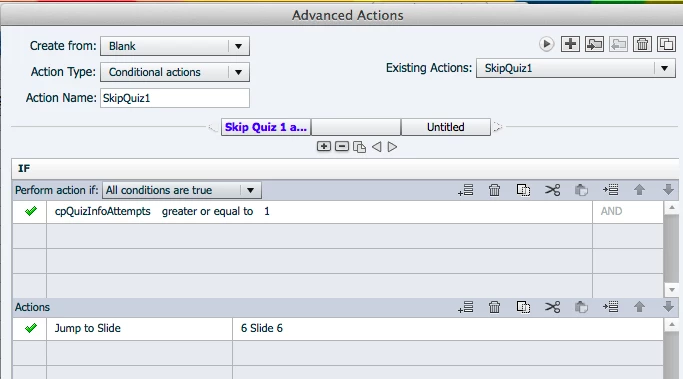
I've tried messing around with Advanced Actions for my presentation nav buttons but I'm definitely doing something wrong because it's causing the course to immediately skip the quiz during a new session rather than the desired behavior of allowing me to take each quiz question (using at least one attempt) but preventing me from returning to those slides once I've used at least one attempt. I've enclosed screenshots of an example advanced action I created that's causing the quiz to be skipped entirely.

Anyone know how I can achieve this?? Thanks in advance!
    This topic has been closed for replies.
    Correct answer Lilybiri

    You are confused by the system quizzing variable cpQuizInfoAttempts which tracks the number of attempts on quiz level, not on question level. From your explanation, you are talking about attempts on question level. There is no system variable which allows you to track it. You can only track it by creating and using user variables, one for each question slide. They could be Boolean variables, with an original value set to 0, and assigned to 1 when entering the slide, after checking the condition I would recommend a shared action, with the user variable being a parameter. Maybe something like this (sorry, no time to double-check):

    On Enter for quiz slide:

        IF v_quest1 is equal to 1                   v_quest1 being a parameter

             Go to Next Slide

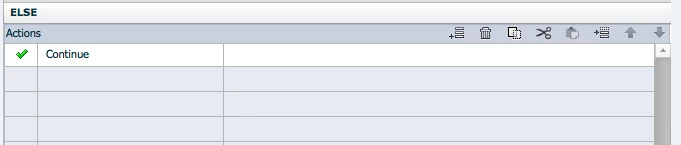
        ELSE

             Assign v_quest1 with 1

            Continue

    BTW Maybe you could download my descriptive table with system variables:

    System variables in Captivate 8/9 - Captivate blog

    1 reply

    Lilybiri
    LilybiriCorrect answer
    Legend
    February 17, 2017

    You are confused by the system quizzing variable cpQuizInfoAttempts which tracks the number of attempts on quiz level, not on question level. From your explanation, you are talking about attempts on question level. There is no system variable which allows you to track it. You can only track it by creating and using user variables, one for each question slide. They could be Boolean variables, with an original value set to 0, and assigned to 1 when entering the slide, after checking the condition I would recommend a shared action, with the user variable being a parameter. Maybe something like this (sorry, no time to double-check):

    On Enter for quiz slide:

        IF v_quest1 is equal to 1                   v_quest1 being a parameter

             Go to Next Slide

        ELSE

             Assign v_quest1 with 1

            Continue

    BTW Maybe you could download my descriptive table with system variables:

    System variables in Captivate 8/9 - Captivate blog

    Participating Frequently
    February 17, 2017

    Thank you so much! I'm going to try this strategy and I'll keep you posted if it doesn't pan out. And THANK YOU so much for the link to the system variables guide! I was looking all over for something exactly like this!