sam_amara
Known Participant
April 1, 2023
Answered

Hiding a Continue Button Until all Flipcards are Turned

  • April 1, 2023
  • 1 reply
  • 1057 views

Good morning, all; 


I am having an issue that I thought/hoped would be fixed with a simple advanced action, but it seems that is not the case, so I was hoping someone here may have a quick, not-too-complex solution. 


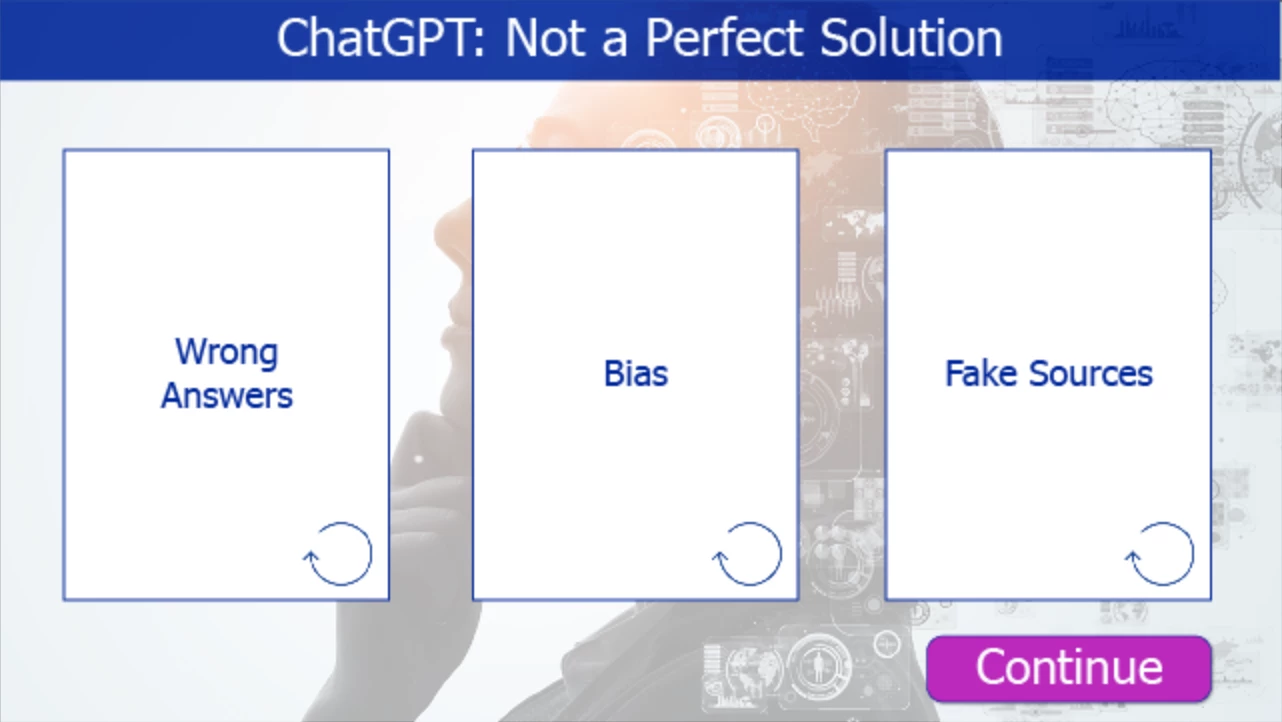
I have made a slide with three simple flipcards:


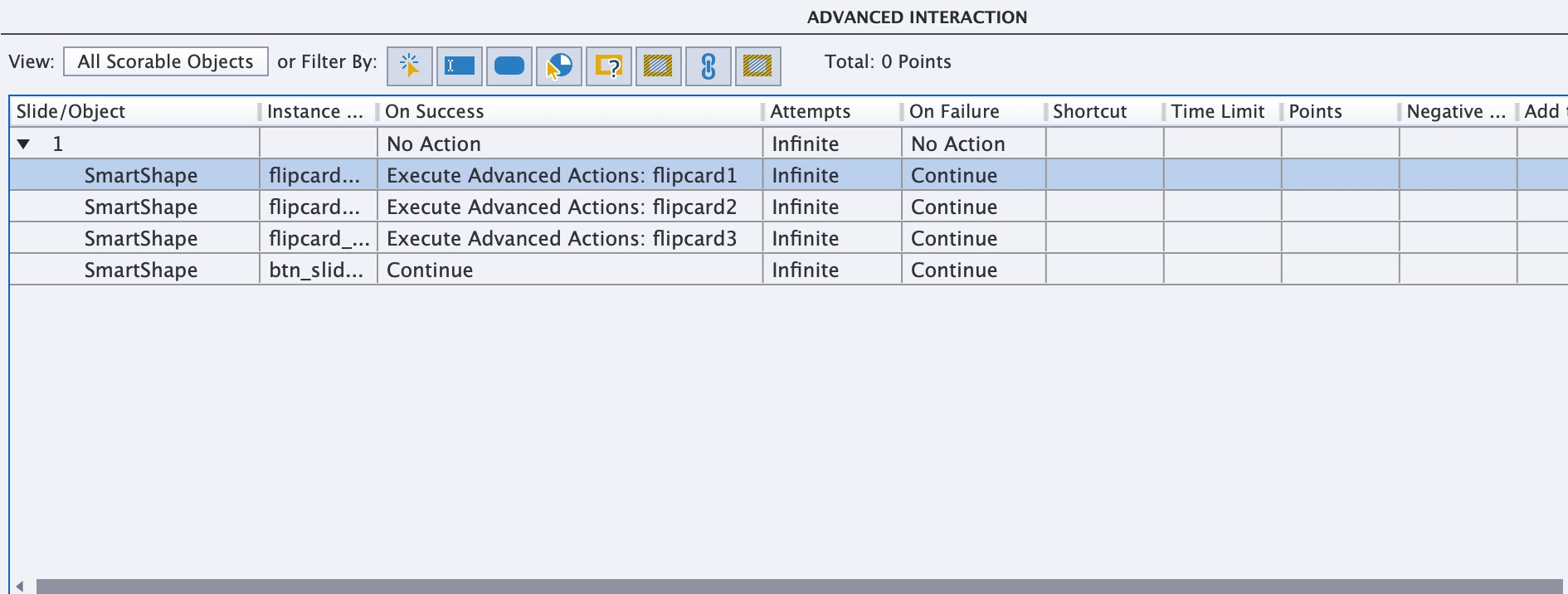
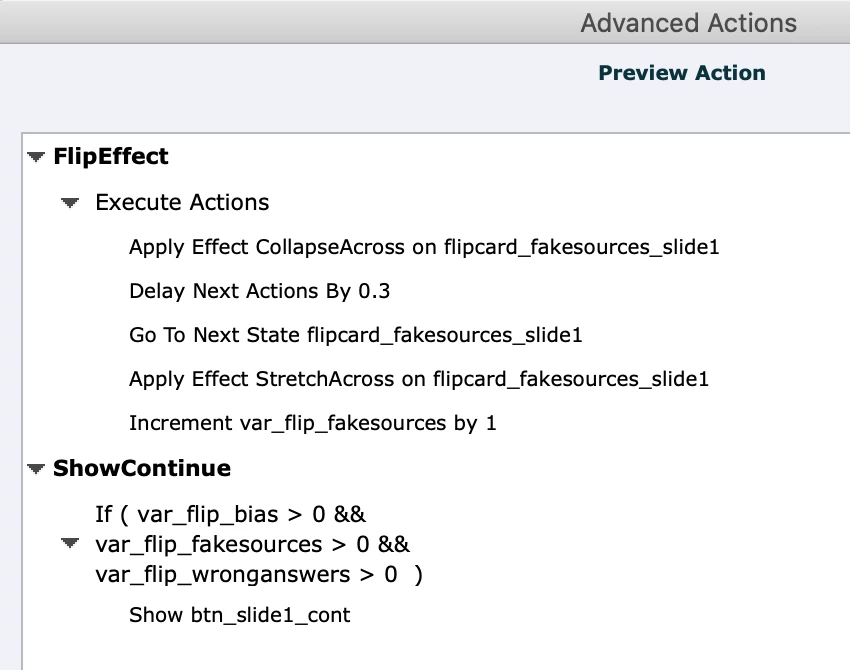
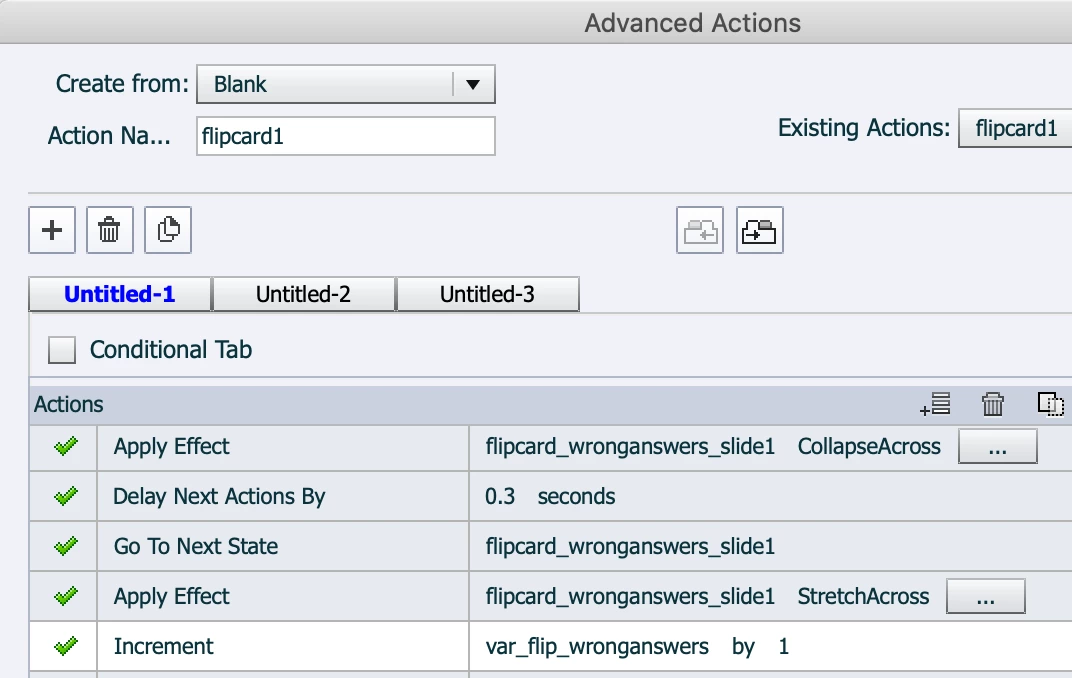
Each card their own advanced action and they all work perfectly: 


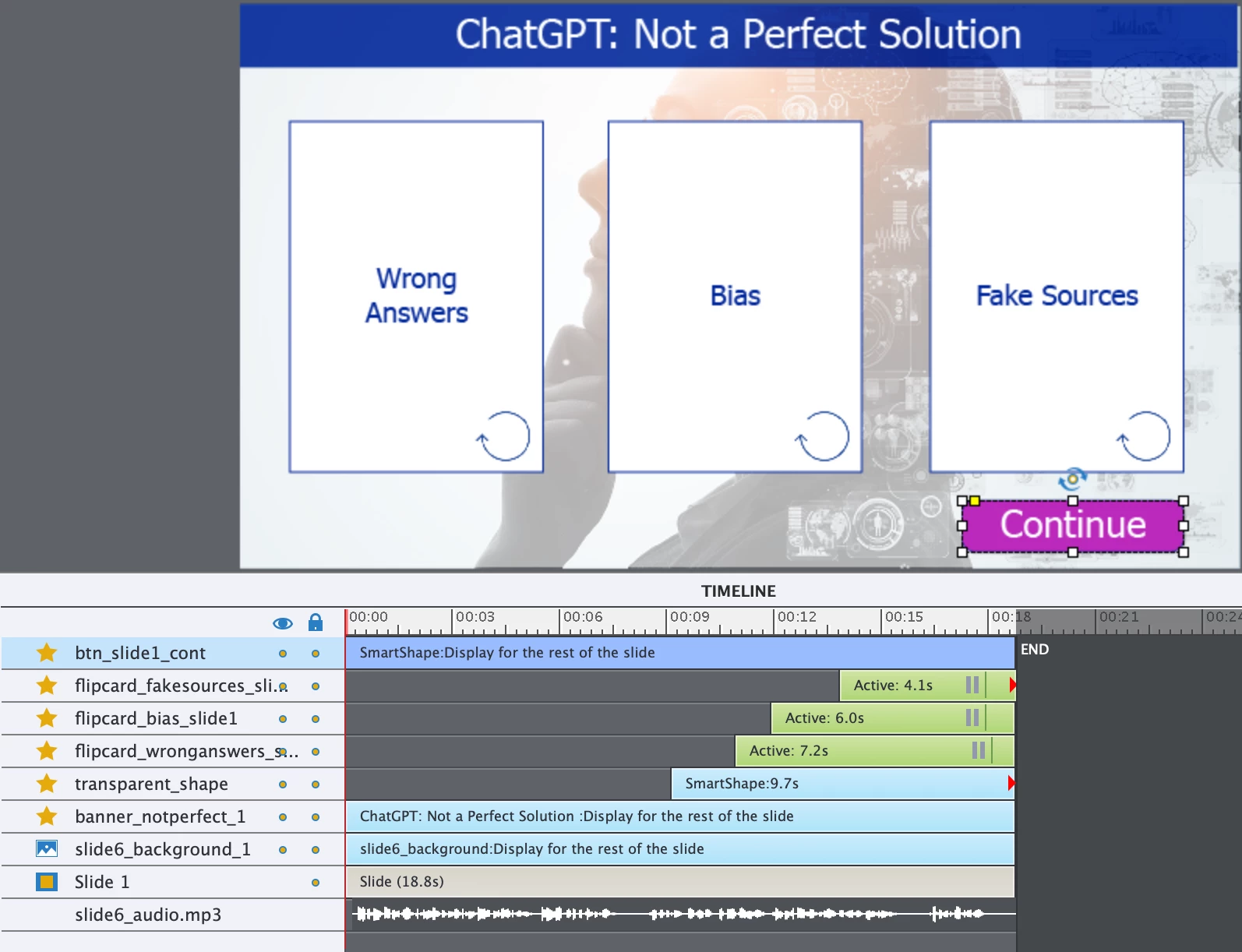
However, as I needed a way for learners to move on after they flipped the cards, I added a Continue button, which you can see in the first screen shot. This way, they can control when to move forward in case they want to reread the cards. However, I want them to turn all the cards to read them before they move forward, so I don't want the continue button to appear until after they have done so.


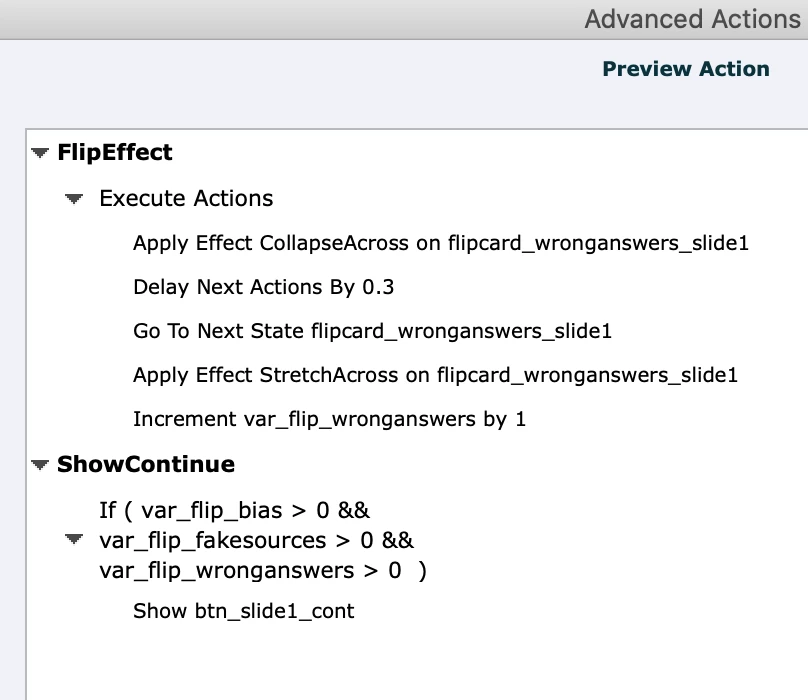
As a possible solution, I created variables for each of the flipped cards and added them to each of the cards' advanced actions to be incremented by 1 when they get a click, which you can see in the second screen shot. 


Then I wrote this simple advanced action to say if all three card variables are greater than or equal to 1, show the Continut button; if not, hide it: 
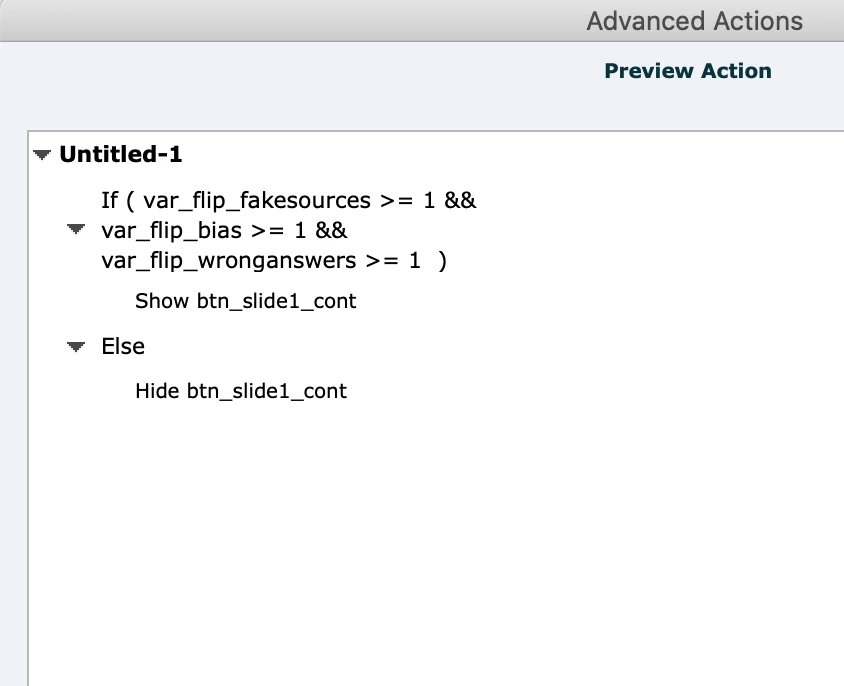


I put this as the action for the slide (Slide > on Enter > Execute Advanced Action), but it doesn't work. Perhaps I put it in the wrong place, or wrote it wrong, or it's not possible, or I'm missing something. 


Does anyone have any ideas? Again, something not too time consuming or complex because I have to finish this project ASAP and this is the last of the wrinkles. 


TIA!

samamara

    This topic has been closed for replies.
    Correct answer Lilybiri

    Thanks again @Lilybiri - but I can't seem to get it work. I have isolated this slide in a simple project on it's own, and there's nothing in it but these few elements, three variables and three advanced actions with two decisions each but it's not showing the continue after I click all three cards in the HTML5 preview. I'm not sure what I'm missing. I feel it should be a simple fix but clearly I'm missing something. 

    Any other ideas you have would really be appreciated!

    Thanks


    I cannot test because my license has expired waiting for extension. Or I would have double-checked 

    Can you just for testing take out the Delay? Or better, move the Increment to the top of the commands... 

    Due to the Delay the Increment happens before the condition is checked... Sorry for that, due to me being without access to CP.

    1 reply

    sam_amara
    sam_amaraAuthor
    Known Participant
    April 1, 2023

    PS: the Continue button is set to be hidden in the output (with the mark across the eye in the Properties panel, and here is an image of the timeline, in case it's relevant: 


    Thanks!

    Lilybiri
    Legend
    April 1, 2023

    I have described exactly this use case during a webinar in 2020 (about shared and advanced actions) and created this blog post:

    https://blog.lilybiri.com/tips-and-tricks-advanced-to-shared-action-intermediate

    You need to embed the conditional action in the flipcard actions. In this example case I use a shared action, which can be reused over and over again even with more or less flipcards. 

    Until recently the recording was still in the eLearning community, but I fear it has now disappeared.

    However a comment on your timeline. Please have all the pausing points of the flipcards at the same frame, even thought they appear staggered. I also don't understand the slide duration which is much longer than the audio timeline. Since the pausing points keep the playhead paused, there is no need to add so many inactive frames. I don't know the functionality of Shape_2 which is anchored to the end of the slide timeline and IMO will never be visible because the last pausing point is before its timeline. Last question: why is the background image delayed?

    sam_amara
    sam_amaraAuthor
    Known Participant
    April 1, 2023

    Many thanks @Lilybiri ! I was hoping for a quick answer and am not at all surprised that you were the first in the pool here. I'm not sure I'm going be able to replicate what you've done in your blog, as I'm nearly out of time. Is there anything that I can do/add to the advanced actions I already have written to make this as quick and easy as possible? In future I can follow what you've shown but for now I need a much faster solution. I may have to just have the continue button on the slide and hope they turn the cards, but I really don't want to do that. 


    I will change the pause points to the same frame and will shorten the slide duration. I didn't think it mattered since I just want them to click to flip and then hit continue when they are finished reading. Thanks for that!

    Shape 2 is a semi-transparent shape that covers the background before the cards appear. It is visible in the HTML5 preview though. The background delay was a mistake; still needed tighten up the timeline. 


    Thanks again!

    samamara