Hi,
Thanks for your help. Here are the answers to the other questions.
1) I wanted the user to be able to click in any order they liked.
2) I would like the captions to stay visible, if possible so they shouldn't need to click on them again.
3) They would only view the slide once before moving on.
Thanks
OK, then will try to give you some help.
- Create the five text captions, label them something like TC_1, TC_2, TC_3, TC_4, TC_5 and uncheck the visibility in the Properties panel for those captions
- Create the five 'items' they have to click on: either you create them as buttons (image buttons), or as click boxes over an image, that is up to you. But be sure to label the interactive object (either the click box or the button) in a similar way as the text captions. Example for click boxes: CB_1, CB_2, CB_3, CB_4, CB_5. This will make them easy to recognize which one is linked to which caption in the advanced actions
- Create the Next button and uncheck its visibility in the Properties panel; I would label it Bt_Next
- Create a user variable v_counter; you could give it an initial value of 0, but it is not really necessary because that is the default value
Now the advanced actions, which is the most difficult part because you'll need a conditional action proceeded by a standard action which is a bit confusing to achieve. If you want more detailed explanation, have a look at my article
http://kb2.adobe.com/community/publishing/862/cpsid_86254.html
You need an advanced action for each click box, but you can duplicate and edit the first advanced action I'm now describing. I will label it CB_1_ac to make it clear that it will be triggered by CB_1; this action will have 2 decisions: the first, will label it ShowTC is a mimicked standard action, that will show the text caption (or the image, forgot to ask what you will show), disables the present click box and increments the counter; the second, labeled CounterCheck is a real condition that checks the value of the counter and if it reaches 5 will show the Next button; you only use the first page for each decision, not the ELSE part:
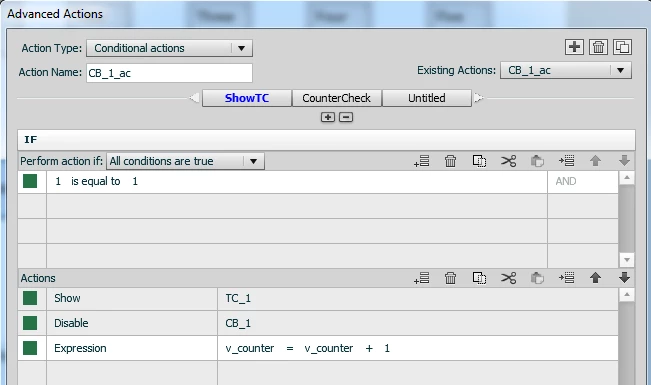
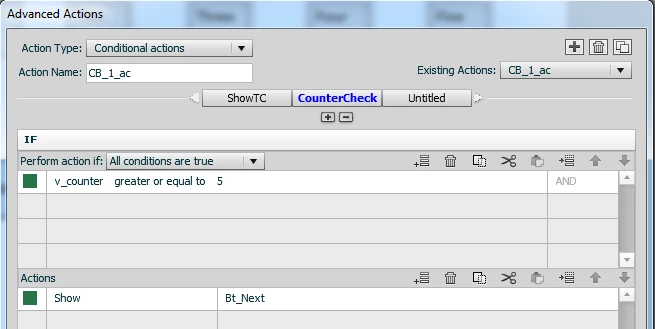
This action has to be duplicated 4 times to have the actions CB_2_ac....CB_5_ac. You have to edit only the Actions part of the decision ShowTC to change TC_1 and CB_1 to TC_2.... CB_2 etc
Then attach those actions to their click box, as Success action in the Properties panel. Try it out... I created this sample and it works fine.
Lilybiri
 AdChoices