


Question
Hiding Slides in Caprivate 12.5 for Mac
I'm a long time user of Captivate, though it has been about 2 years since my last project. I just installed the new Captivate 12.5. After getting comfortabvle with he new recording mechanisms, I've got 2 projects to work on.
My style is to record, then watch back and take notes, and hide or delete slides before editing anything.
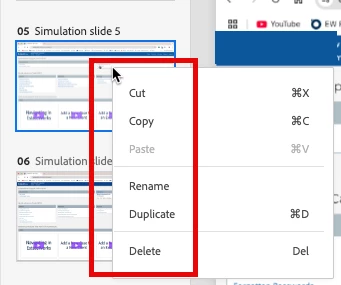
I have my Mac mouse set as a PC mouse, so I can left and right click. Right clicking no longer offers me the option to hide a slide. So how the heck do we do that?
And why is there no ribbon or any tools beneath the title bar?
Thx!
 AdChoices