
RodWard
Community Expert
Community Expert
August 24, 2015
Question

High Fidelity PPT import option appears to be missing from Cp 8 and 9

  • August 24, 2015
  • 2 replies
  • 1503 views

Is anyone else noticing that the High Fidelity import option normally present as a check box low down on the import dialog for PowerPoint slides is now missing?
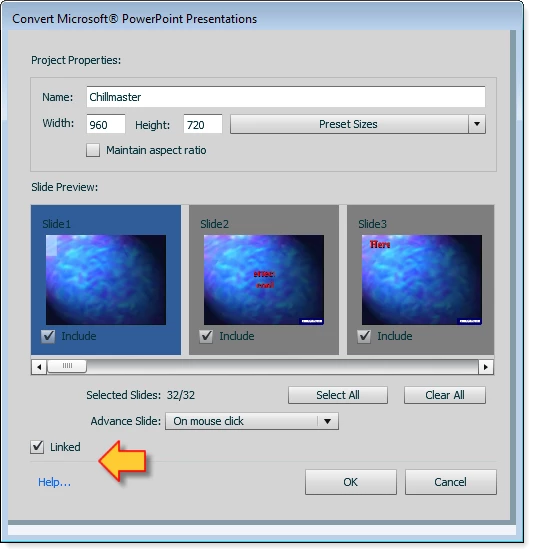
My gut is telling me that it's still actually there but something has happened to the sizing of the dialog and it is now being hidden below the slightly visible horizontal line you can barely see just above the OK and Cancel buttons.

    This topic has been closed for replies.

    2 replies

    Participating Frequently
    August 24, 2015

    Hi Rod,

    Looking at the screenshot i guess you must be trying one of the two things below,

    1.Trying to open a .ppt file in Windows from Captivate(not .pptx file)

    or

    2.Trying to open .ppt or .pptx file in MAC OS from Captivate.

    High Fidelity is not supported in any of the above two cases. Can you please check and confirm weather you are trying any of the above two cases. If not can you please share the PPT file with us at dgp at adobe dot com.

    Thanks

    Devraj

    RodWard
    Community Expert
    RodWardCommunity ExpertAuthor
    Community Expert
    August 24, 2015

    I'm on Windows 7 using Cp8 and 9 but also tried it in Cp6 and 7.

    Yes I was opening a PPT file.  However, I seem to be having an issue opening any PPTX files.  I get an error message like this one.

    I've never had this error before when trying to open PPTX files but it could be related to the fact that I recently changed over to Microsoft Office 365.  Captivate seems to be choking on something about PPTX files now.

    BDuckWorks
    Inspiring
    August 27, 2015

    Has the PPT file been edited in MS Office 360, or is this error occurring only after installing it?

    If it hasn't been edited since the update, try opening it in PowerPoint 360 and save as to a new pptx file, then try the import.

    My guess is that Cp is using some supporting files from MS office to process the file during import, and it would be 'happier' if the pptx file and supporting files version numbers matched.

    Gray Susan
    Inspiring
    August 24, 2015

    I noticed it isn't there in CP8 if you are importing from an older version of PowerPoint but when you import a .pptx the high fidelity option appears.

     Susan Wright (Equilady) Remember, the mighty oak was just a nut that held its ground. http://www.equilady.com

    From: RodWard <forums_noreply@adobe.com>

    To: Susan Wright Davis <smw12aug@yahoo.com>

    Sent: Monday, August 24, 2015 8:01 AM

    Subject: High Fidelity PPT import option appears to be missing from Cp 8 and 9

    High Fidelity PPT import option appears to be missing from Cp 8 and 9

    created by RodWard in Adobe Captivate - View the full discussionIs anyone else noticing that the High Fidelity import option normally present as a check box low down on the import dialog for PowerPoint slides is now missing? https://forums.adobe.com/servlet/JiveServlet/downloadImage/2-7892346-807599/PPT+Import.png My gut is telling me that it's still actually there but something has happened to the sizing of the dialog and it is now being hidden below the slightly visible horizontal line you can barely see just above the OK and Cancel buttons. If the reply above answers your question, please take a moment to mark this answer as correct by visiting: https://forums.adobe.com/message/7892346#7892346 and clicking ‘Correct’ below the answer Replies to this message go to everyone subscribed to this thread, not directly to the person who posted the message. To post a reply, either reply to this email or visit the message page: Please note that the Adobe Forums do not accept email attachments. If you want to embed an image in your message please visit the thread in the forum and click the camera icon: https://forums.adobe.com/message/7892346#7892346 To unsubscribe from this thread, please visit the message page at , click "Following" at the top right, & "Stop Following" Start a new discussion in Adobe Captivate by email or at Adobe Community For more information about maintaining your forum email notifications please go to https://forums.adobe.com/thread/1516624.