


Inspiring
November 28, 2017
Answered

Highlighted button area in published output

  • November 28, 2017
  • 1 reply
  • 359 views

I have used buttons to change the states of characters. I spread the button over the character, so the user could simply click on the character. No matter what type of button I use (text or transparent), a blue outline appears around the button area when it is clicked. How can I get rid of this blue outline? It is appearing on top of text. Very annoying. Thanks for any help. I am using the latest version of Captivate (2017).

    This topic has been closed for replies.
    Correct answer Lilybiri

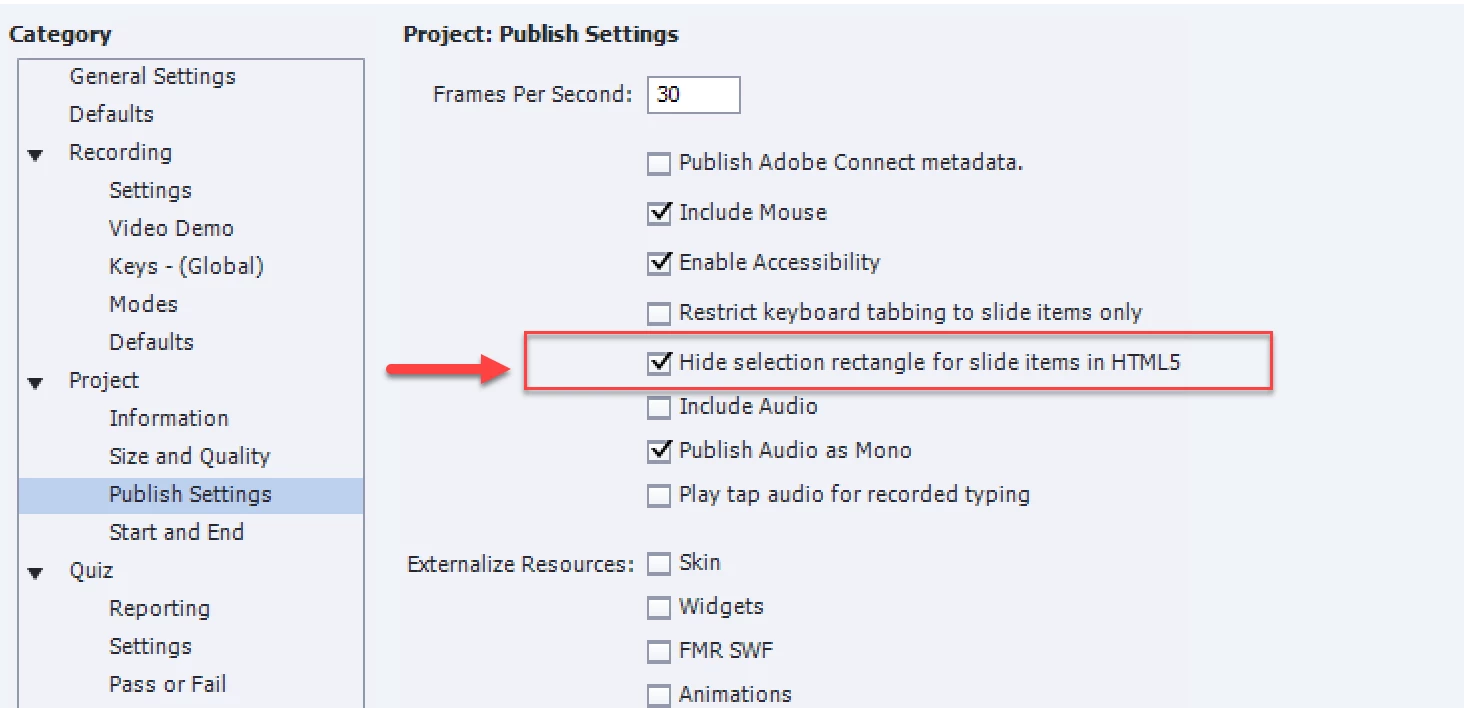
    Did you check this option in Preferences, Project, Publish Settings:

    I have t warn you, for shapes it sometimes is not working and will appear on dekstop screens, not on  mobile devices. At least that is my experience in CP2017.  I logged a bug.

    1 reply

    Lilybiri
    LilybiriCorrect answer
    Legend
    November 28, 2017

    Did you check this option in Preferences, Project, Publish Settings:

    I have t warn you, for shapes it sometimes is not working and will appear on dekstop screens, not on  mobile devices. At least that is my experience in CP2017.  I logged a bug.

    JLKBRAuthor
    Inspiring
    November 28, 2017

    Thank you so much…I had been looking at DEFAULTS rather than the publish settings. By the way, I couldn’t find the CORRECT button to mark your response as correct.

    Lilybiri
    Legend
    November 28, 2017

    May I mark it as correct? I am moderator.