


rajeev0D45
Participating Frequently
April 5, 2021
Question

Hindi text Display wrong in Fill in The Blank Captivate Software

  • April 5, 2021
  • 2 replies
  • 983 views

I am using captivate 2019. When I paste Hindi text in the dropdown under the fill in black, it does not come right as shown in the screenshot below. Please solve this problem.
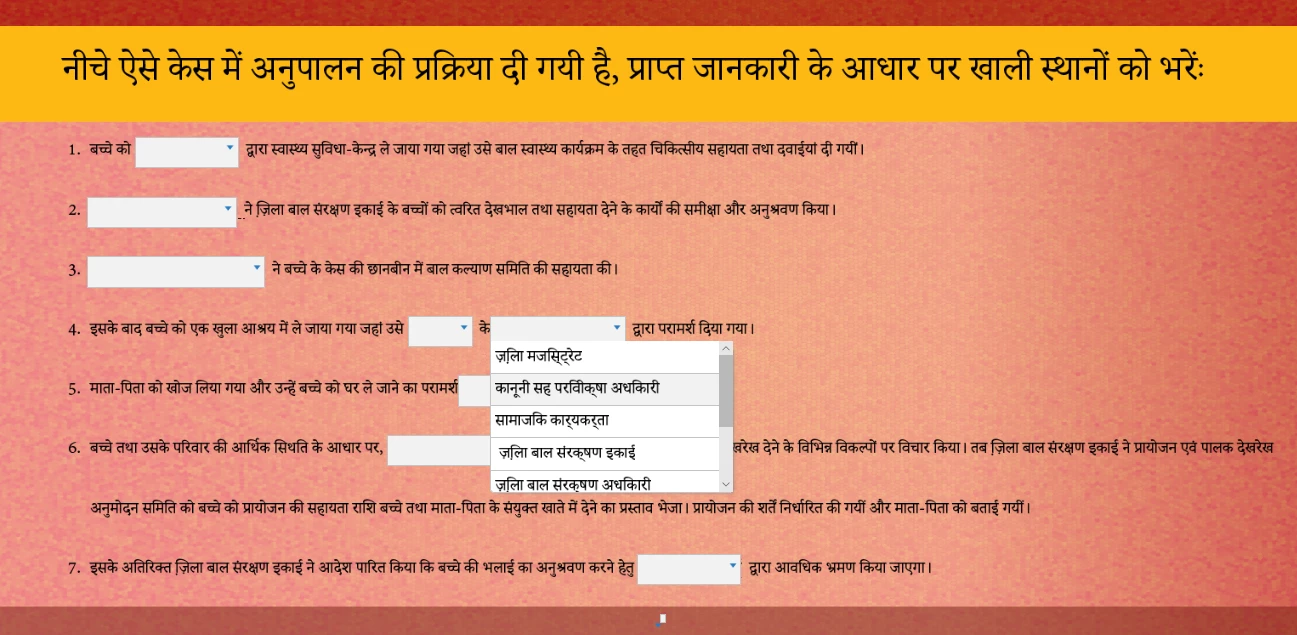

 

This topic has been closed for replies.

2 replies

rajeev0D45
Participating Frequently
April 13, 2021

Sorry, i didn't not get right answer?
Problem: The Hindi text appears in the captivate working file is correct but the text (Hindi caracters) does not look correct (under fill in the blanks) when I Export it in HTML format.

Many other activities have been done by me in Hindi (for example drag and drop ture and false etc. ) but they do not have any problem. Problem is only under the fill in the blanks (Drop down) text.

rajeev0D45
Participating Frequently
April 13, 2021

Sorry, i didn't get right answer?

Paul Wilson CTDP
Community Expert
Community Expert
April 13, 2021

One of the problems with this page is that it's merely a user forum. If you were hoping for an Adobe staff member to jump on this thread and assist you could be waiting a long time. I would suggest you reach out to Adobe for technical support on this issue. Send an email explaining your situation to CaptivateHelp@Adobe.com to have someone from Adobe get back to you.

Paul Wilson, CTDP
Paul Wilson CTDP
Community Expert
Community Expert
April 7, 2021

Please remember that this is a user forum. If you would like to report this as either a bug or a feature request you can do so using the following link: https://adobe.allegiancetech.com/cgi-bin/qwebcorporate.dll?Y9CHVD


A workaround might be to add spaces to the left of each answer in your dropdown list so that they all line up to approximately the correct position.


Also, you can right-align the entire sentence if you need that as well.


Paul Wilson, CTDP
rajeev0D45
Participating Frequently
April 7, 2021

Sir
The text appears in the captive file is correct but the text does not look correct when I Export it in HTML format.


Paul Wilson CTDP
Community Expert
Community Expert
April 7, 2021

I don't have a lot of experience with RTL languages so I don't know all the rules and I haven't developed any eLearning using such languages. I do know that I have had success by adding extra spaces into the answer fields when it appears to cut off my answer text.

Paul Wilson, CTDP